HubSpot apps and themes
These are the HubSpot products I build and support myself. Gatehouse is a member portal theme with a signed-in area for associations, Events Calendar and Agenda is a free module that puts your event schedule on any HubSpot page, and Navigator Mega Menu is a free header module that builds your mega menu from a HubSpot navigation menu.
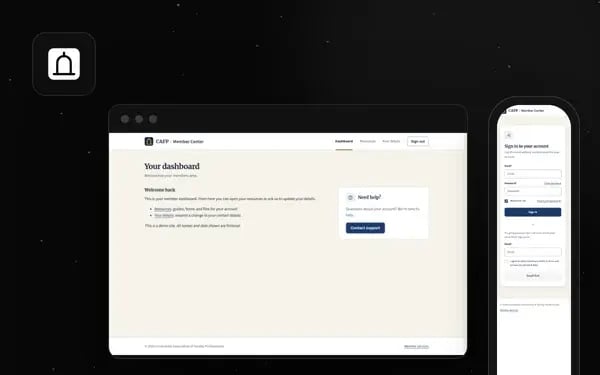
Gatehouse, a HubSpot member portal theme
Gatehouse gives your sign-in, registration, password and members-only pages the same look as the rest of your site. The image above shows two of the theme's own templates on a demo site, the member dashboard on desktop and the sign-in page on a phone, with the logo, colors and fonts set once in theme settings rather than hand-built page by page.
For: associations and member organizations running members-only pages on Content Hub Professional or Enterprise.
Price: $599 on the HubSpot Marketplace, free support in English. | Free fit check
Read the full page | Get it on HubSpot
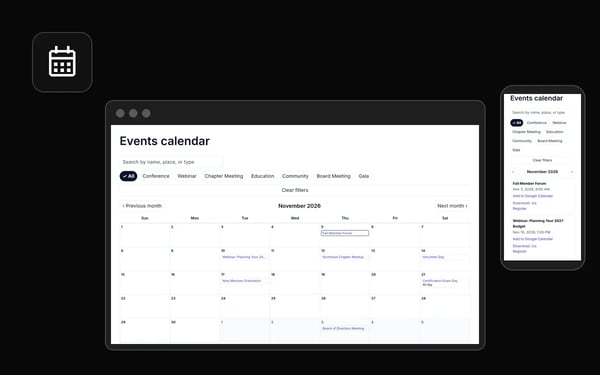
Events Calendar and Agenda, a free HubSpot events module
Events Calendar and Agenda shows your conferences, chapter meetings, webinars and board meetings as a month calendar, a date-grouped agenda or cards, and you add every event in the normal page editor. Members can search, filter by event type and add any event to their own calendar, and an event stays in Happening now until it actually ends.
For: associations and member organizations that run a steady schedule of events on HubSpot.
Price: Free on the HubSpot Marketplace, free support in English.
Read the full page | Get it on HubSpot
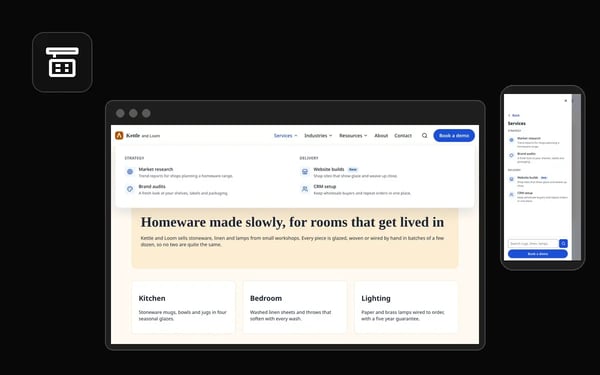
Navigator Mega Menu, a free HubSpot mega menu module
Navigator Mega Menu builds your site header from a standard HubSpot navigation menu, so you edit links in one place and every page updates. It works by keyboard, turns into a full-screen drawer on phones, and its Brand Accent preset takes your theme's primary color.
For: marketing teams that run their website on HubSpot and want a mega menu they manage in Navigation Menus.
Price: Free on the HubSpot Marketplace, free support in English.
Open the live demo | Read the full page
Frequently asked questions
Which HubSpot subscription do I need?
It depends on the product, and each product page says so near the top. Gatehouse needs Content Hub Professional or Enterprise, because members-only pages depend on HubSpot memberships, and legacy CMS Hub Professional does not include memberships. Private content also needs a connected domain. I would rather you find that out here than after a purchase, so check your subscription in your account settings before you buy. If your account shows a name you do not recognize, ask me through the contact form and I will tell you whether it qualifies.
Will a theme or module change my CRM data?
Gatehouse does not touch your CRM records. It styles the pages around HubSpot memberships and leaves who can sign in to HubSpot's own private content settings. Its "Your details" page holds a HubSpot form you pick, so change requests arrive as ordinary form submissions and your team decides what to update. Nothing changes on a contact record unless someone on your side changes it. If a future product works with CRM data, its page will say exactly which objects and properties.
Get started
The quickest way to see whether Gatehouse fits your members is to click through the live demo: sign in, open a members page, sign out. Then read the full Gatehouse page for scope and setup.