The logo wall is the easy part. HubSpot Agent Builder can now talk to Gong, Notion, Slack, and a curated list of other apps over MCP. The hard part is the same as every other integration that can write: who cloned the agent, which tools are set to Always allow, and what happens when the blast radius leaves HubSpot objects.
This is not "turn on AI." It is a permission problem with a connector catalog on top. If you connect first and think about writes later, you will learn the hard way.
What HubSpot actually shipped (curated MCP apps, not arbitrary servers)
HubSpot documents a HubSpot MCP client inside Agent Builder. Agents connect to external systems through the Model Context Protocol so they can read live business data and take actions in supported apps without a custom integration for each one. HubSpot's own example is a RevOps agent talking to Gong and Notion to review customer conversations and draft account-planning summaries. That is a capability illustration, not a promise that your Gong calls will auto-summarize themselves with zero prompt work.
The supported list is curated. As of the KB page last updated September 18, 2026, it includes Amplitude, Asana, Atlassian, Box, Canva, Fathom, G2, Gmail, Gong, Google Calendar, Google Chat, Google Drive, Linear, Notion, Slack, Xero, and Zapier. Each app has its own setup and tool surface. You review those on the vendor side before you treat the connector like a finished product.
What this is not: paste any public MCP server URL into Agent Builder and call it done. The product path is a supported-app list plus, for Zapier, a tokenized server URL you build on Zapier's side. If your architecture diagram assumes "any MCP endpoint," redraw the diagram.
Context for the wider release: HubSpot's September 16 Unbound / Fall Spotlight push also introduced Breeze Assistant, Smart CRM, and Context Home (CMSWire, September 16, 2026). Useful date stamp. Not a reason to skip the permission screen.
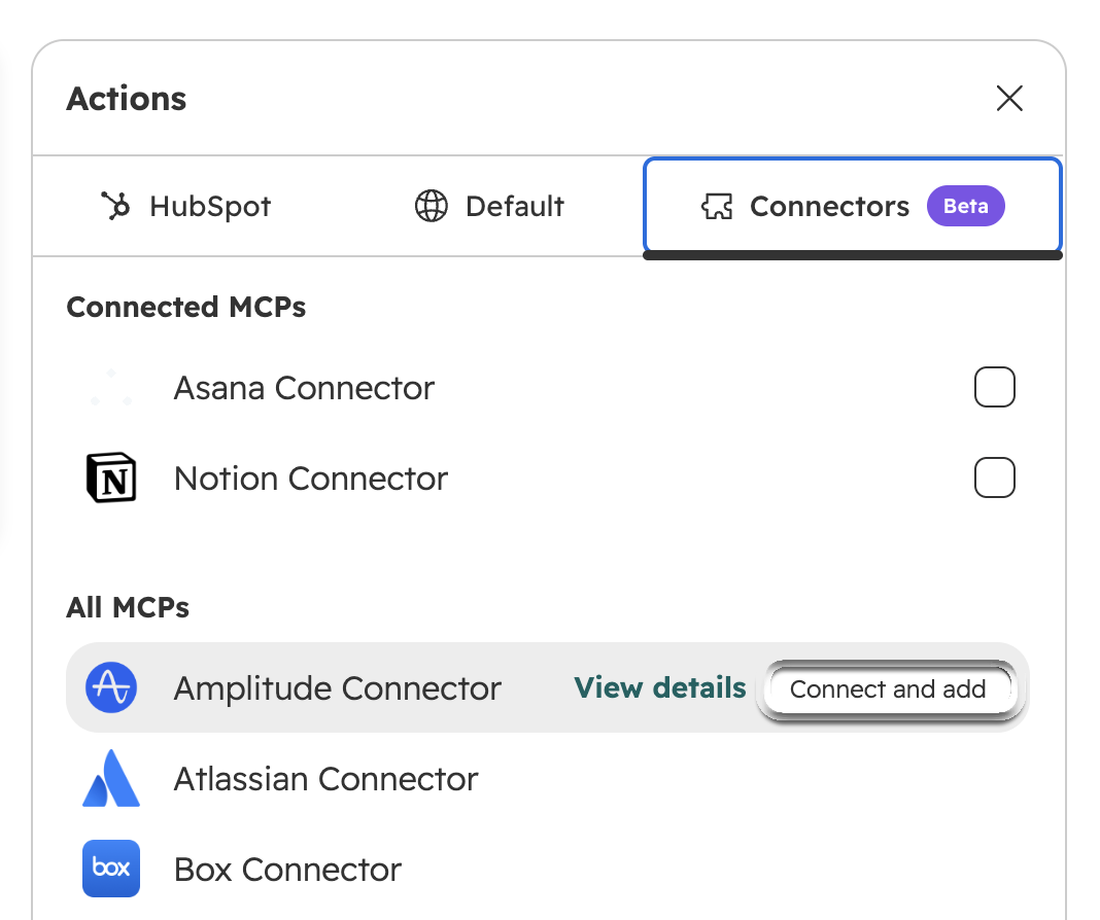
The connect path that clones first
HubSpot's setup steps are not subtle. Before you add a connector, you clone the agent. Then you add an action, open Connectors, pick the app, and authorize.
OAuth apps (Notion and Asana are the KB examples) follow the usual authorize flow. Zapier is different: you create an MCP server in Zapier, pick only the tools that agent needs, copy the Streamable HTTP server URL, and paste it into HubSpot when you connect Zapier MCP. HubSpot's note on Zapier tools is the right instinct for every connector: select only the tools the agent needs for its job.
Clone-first is the operational pattern. Do not edit the production agent in place while you experiment with write tools. Clone, connect, prove the narrow path, then promote. If your portal still treats Agent Builder like a shared scratchpad with one agent everyone edits, fix that ownership model before you hand it Gong write tools.
Agent Builder permissions are required to create and customize agents. Extra HubSpot permissions may still apply depending on what the agent is asked to do. An agent that publishes a landing page still needs the landing-page edit and publish rights. MCP does not invent a second permission plane that overrides HubSpot.
Always allow vs Ask vs Never on write tools
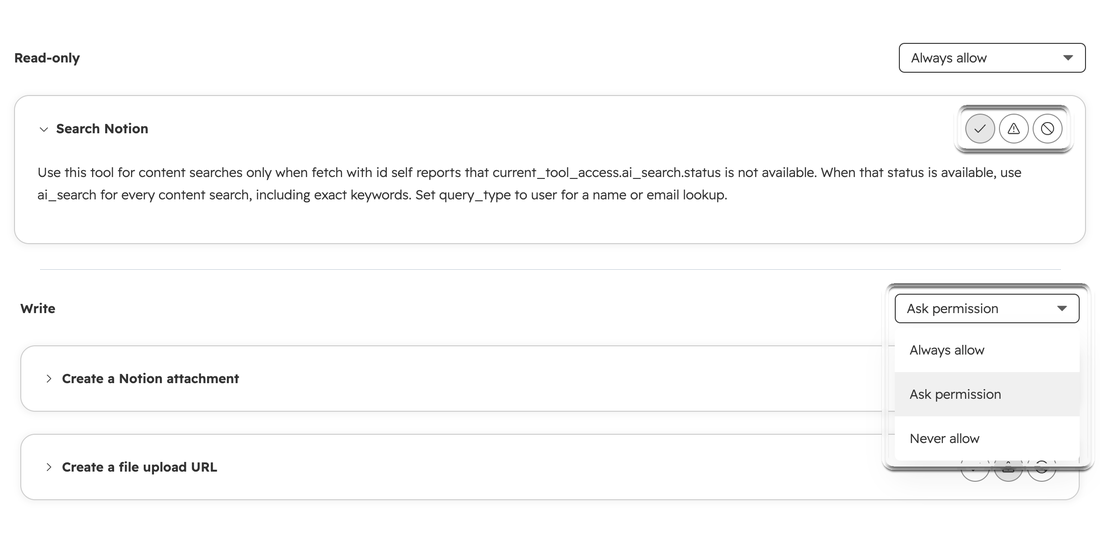
After the app is connected, you configure tool permissions. HubSpot's path is Settings, Integrations, Connected Apps, open the app, Settings tab. You will see read-only tools and write tools. For each tool you pick one of three:
Always allow: the tool runs without a confirmation prompt. Ask permission: you approve each time the tool is used. Never allow: the tool is unavailable.
You can set permissions one tool at a time, or apply the same setting to all read tools or all write tools from the section dropdown.
This is the whole post in one screen. Always allow on a write tool is a standing order. Ask permission is a human in the loop. Never allow is how you keep a "summarize the call" agent from also updating the remote system.
Default posture for a first production agent: read tools on Ask or Always only after you have watched them; write tools on Never or Ask. Always allow on writes is for jobs you have already proven on a clone, with a named owner, and with a kill path you can reach in one minute. If you cannot name who will answer the Ask prompt at 6pm on a Friday, do not put writes on Always allow.
HubSpot Credits may be required for certain agent features. Treat that as a metering note, not a blank check that "credits mean it is safe." Credits measure usage. They do not replace tool permissions.
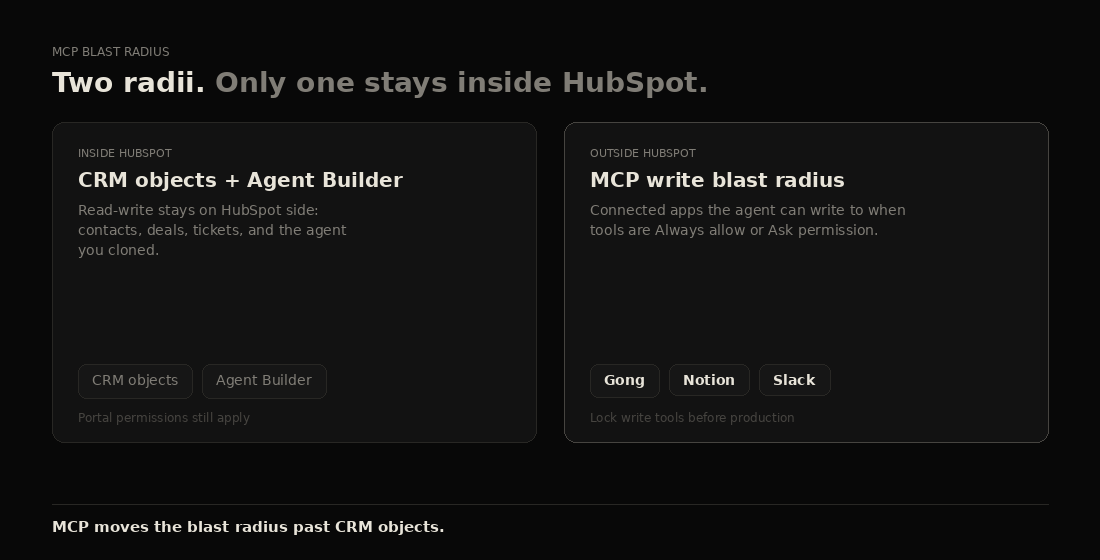
Where the blast radius leaves HubSpot objects
Inside HubSpot, a bad agent write is still a HubSpot audit problem. Outside HubSpot, the same agent can create or change records in Gong, Notion, Slack, Asana, or whatever you connected. Your CRM hygiene habits do not automatically travel with the OAuth token.
Think in two blast radii:
Inside HubSpot: which agent, which clone, who can edit agents, what HubSpot objects the agent can already touch through normal HubSpot permissions. Outside HubSpot: which write tools are Always allow, what the remote app will accept from that token, and who owns the remote workspace.
A Gong-connected agent that can only read calls is a different risk than one that can also write. A Notion agent that can draft in a private section is a different risk than one that can edit the company wiki. The connector logo does not encode that difference. The tool permission list does.
If your HubSpot is not ready for agents on its own objects, do not add a second system for the agent to mutate. Start with whether the portal is ready for AI agents, then add outbound MCP.
A short checklist before production
- Name the owner of Agent Builder edits. One person, not a shared login.
- Clone the agent before you connect a new app. Keep the production agent boring until the clone passes.
- Connect one app first. Prove the job on that app before you stack Gong plus Notion plus Slack on day one.
- Open Connected Apps and list every write tool. Set writes to Never allow or Ask permission until you have watched real runs.
- For Zapier MCP, copy only the tools required for the job into the Zapier MCP server. Do not paste a kitchen-sink tool list into HubSpot.
- Confirm the HubSpot permissions the agent still needs beyond MCP (publish rights, CRM edit rights, and so on).
- Confirm whether the agent path will burn HubSpot Credits, and who watches that meter.
- Write the kill steps: disconnect the connector, set write tools to Never allow, unpublish or disable the agent. Names on each step.
- Run a gold-set test: five real prompts you already know the answer to. Compare remote-system side effects to what you expected.
- Only then promote the clone. Widening Always allow on writes is a second decision, not a default.
FAQ
Does HubSpot MCP in Agent Builder mean any MCP server?
No. HubSpot documents a curated supported-app list. Zapier is the documented path when you need a tokenized MCP server URL you configure yourself. That is still not "any server on the internet."
Who needs Agent Builder permissions?
People who create and customize agents and assistants in Agent Builder need Agent Builder permissions. The agent may also need other HubSpot permissions for the work it performs. Connecting an app does not replace those requirements.
What happens with a Zapier tokenized URL?
You create an MCP server in Zapier, choose the tools, copy the Streamable HTTP server URL, and paste it into HubSpot when connecting Zapier MCP. HubSpot recommends selecting only the tools the agent needs. The URL is a credential. Treat it like one.
Should write tools ever be Always allow?
Yes, after the job is proven on a clone, the owner is named, Ask permission has been watched in real use, and you can kill the connector quickly. Always allow on an untested write tool is how a helpful agent becomes a remote write script.
Is this the same as HubSpot's remote MCP server for Claude or ChatGPT?
No. Agent Builder MCP connectors are HubSpot agents reaching out to supported apps. HubSpot's remote MCP server and chat connectors are external AI clients reaching into HubSpot. Same family of ideas. Different door. Different permission screen. Do not reuse one runbook for both.
Related
- Is your HubSpot ready for AI agents?
- ChatGPT Ads in HubSpot is a closed loop
- HubSpot CRM architecture
- HubSpot portal audit
Primary source: Connect apps to HubSpot's AI agents (HubSpot Knowledge Base, updated September 18, 2026).
If you want a second set of eyes on Agent Builder MCP connectors, clone strategy, or write-tool permissions before you go to production, use the contact form on allgusto.com.