Yes, HubSpot Agent Builder will now take a custom MCP server, meaning your own, so Breeze agents can call tools you host. HubSpot's developer platform has a public-beta mcp-server component that registers an external MCP server so its tools show up in HubSpot Agent Builder for any account that installs your app (HubSpot developer docs). The catch is everything around that sentence. You need an OAuth 2.1 server with PKCE, a redirect URI HubSpot picks for you, refresh tokens whether or not your provider likes issuing them, and a public HTTPS endpoint from day one. For the Marketplace, add a standalone app, a feature flag that starts OFF, an Ecosystem review, and proof you own the server.
To fence this off: this is not HubSpot's own MCP server at mcp.hubspot.com, which lets Claude or ChatGPT reach into your CRM, and it is not the curated Gong and Notion connector list. This post covers each gate, who should bother, and a build order. One honest caveat: the public conversation about shipping one of these is thin. Looking for teams running a custom MCP server inside HubSpot Agent Builder, I found HubSpot's docs, adjacent custom-agent chatter, and little else. Read this as mechanics, not a trend report.
Custom mcp-server component vs the curated MCP Client list
The component is a JSON file in a HubSpot developer project. You create a *-hsmeta.json file inside app/mcp-server/, set type to mcp-server, and fill in mcpUrl, mcpClientId, requiredScopes, plus the name, description, logo, website, and privacy policy customers see (schema reference). Upload with hs project upload, install the app, and your server appears in HubSpot Agent Builder under Add tool, in the MCP Servers category. You need beta access, an authenticated HubSpot CLI, platformVersion 2027.03-beta or newer (or the upload fails with unsupported type: mcp-server), and oauth in the app's scopes even if your server never reads a HubSpot record. HubSpot says the beta falls under its Developer Terms and Developer Beta Terms and is subject to change.
One field deserves a warning label. requiredScopes are your server's OAuth scopes, not HubSpot's, and an empty array connects with access to every tool the server exposes. Convenient in a test account, a bad habit anywhere else.
Compare that with HubSpot's KB article "Connect apps to HubSpot's AI agents" (HubSpot KB), which is the admin side and what I covered last week as the curated Gong and Notion list. There, a user clones an agent, opens the Connectors tab, picks a supported app, and authorizes with OAuth or, for Zapier, a tokenized server URL. No code, no project, no review. The telling contrast is that URL: the Zapier path works by pasting a server URL that carries its own access, while the listing rules call token-in-URL an anti-pattern your own component must avoid.
OAuth 2.1 with PKCE, and no Dynamic Client Registration
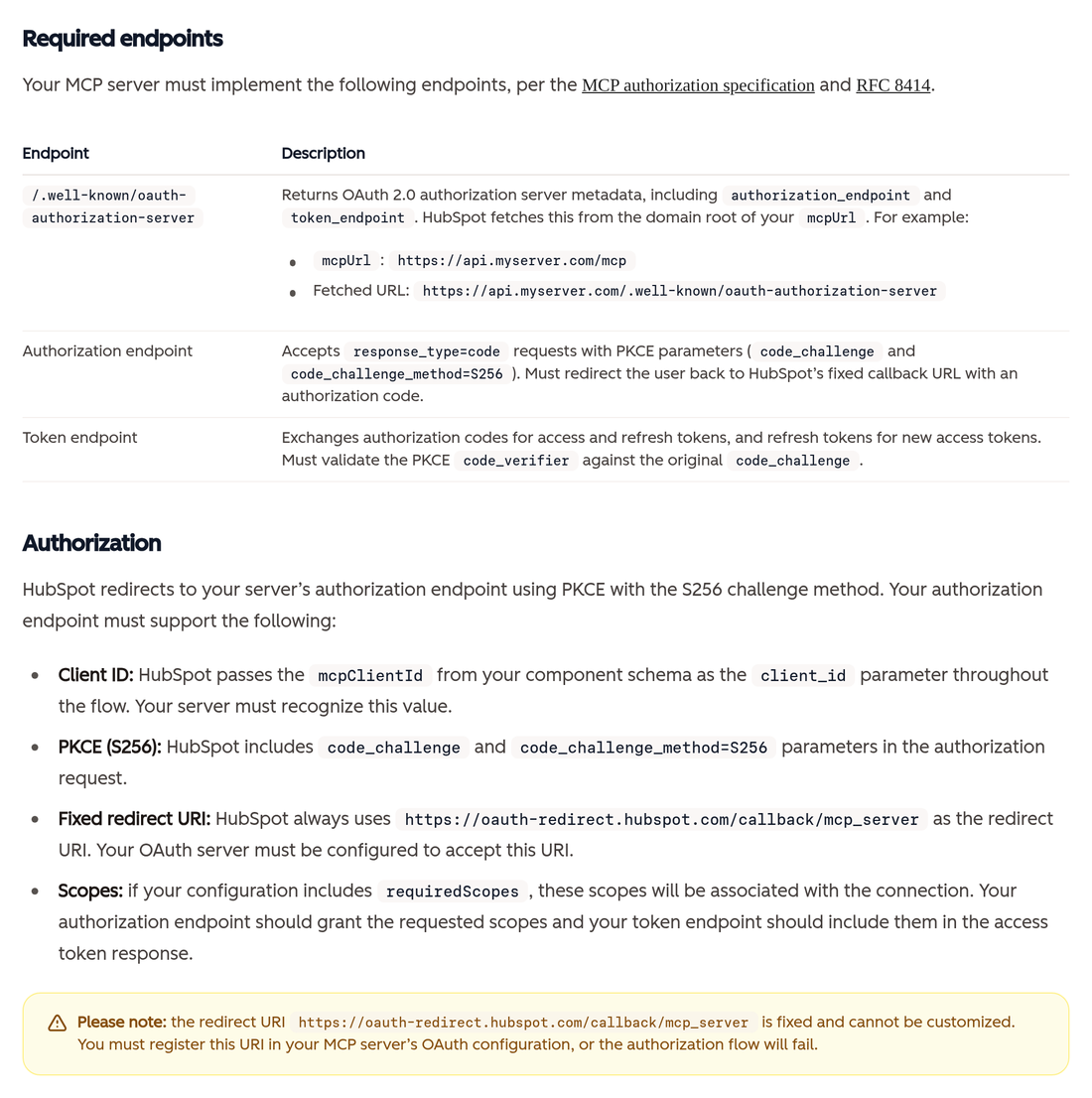
HubSpot connects with an OAuth 2.1 authorization code flow using PKCE with the S256 challenge method, sending code_challenge_method=S256 on the authorization request (OAuth requirements). HubSpot's backend fetches metadata and exchanges tokens server-side. The user's browser only handles consent. You need a metadata document, an authorization endpoint that accepts PKCE parameters, and a token endpoint that validates the code_verifier.
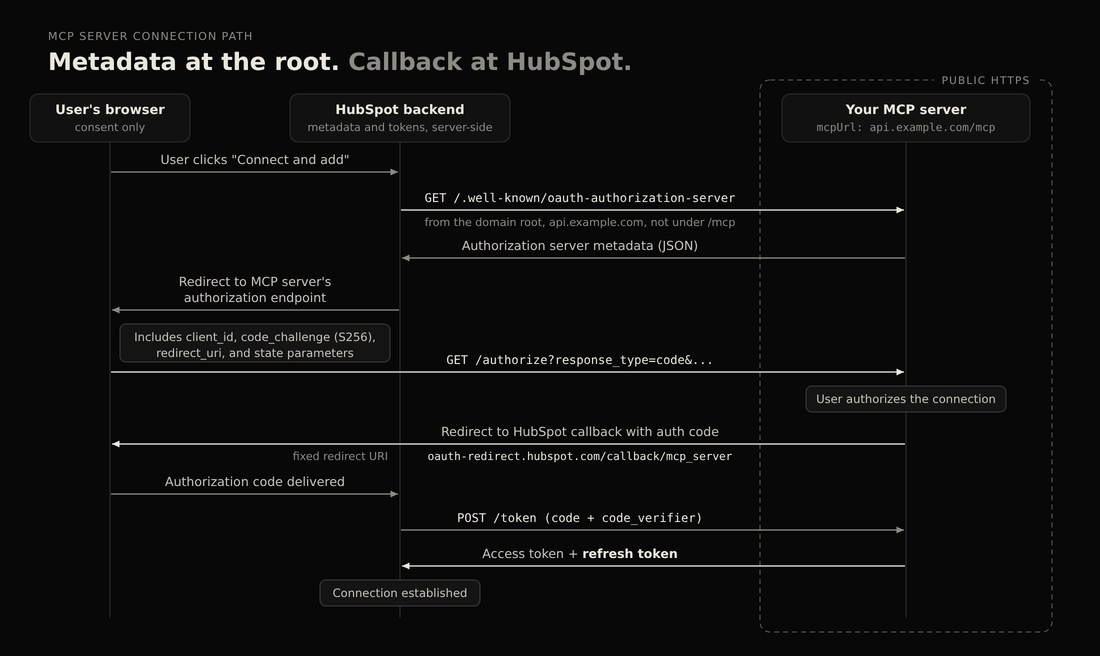
There is no Dynamic Client Registration. You generate a client ID ahead of time, put it in mcpClientId, and HubSpot passes it as client_id through the whole flow. That ID identifies every request agents make to your server, so it is also how you tell HubSpot traffic apart.
The metadata location is the quiet trap. HubSpot fetches /.well-known/oauth-authorization-server from the domain root of your mcpUrl, not from next to the MCP path. If mcpUrl is https://api.myserver.com/mcp, HubSpot asks for https://api.myserver.com/.well-known/oauth-authorization-server. If your server lives under a path on a shared domain, whoever controls the domain root has to publish that file for you.
The fixed redirect you do not get to pick
HubSpot always uses https://oauth-redirect.hubspot.com/callback/mcp_server as the redirect URI. It cannot be customized, and if oauth-redirect.hubspot.com/callback/mcp_server is not registered in your OAuth configuration, the flow fails (fixed redirect URI). Technically that is one line. In practice, a production redirect allowlist is guarded for good reason, and adding a third party's callback is a security conversation, not a developer's afternoon. Plan the approval before you plan the sprint.
Mandatory refresh tokens, even though the spec calls them optional
HubSpot requires the code exchange to return both an access token and a refresh token, and your server must support the refresh_token grant (refresh token requirement). HubSpot's docs are candid about the tension: OAuth 2.1 lets the authorization server decide whether to issue refresh tokens, and the MCP spec says clients must not assume one. HubSpot's client assumes. Servers that cannot issue refresh tokens are not currently supported.
Then there is offline_access. Some providers need it to issue a refresh token, some do not, and some reject it. HubSpot does not add it automatically, so add it to requiredScopes only when your provider requires or accepts it, then check the token response for a refresh_token. The nasty part is the delay. HubSpot's troubleshooting covers connections that work, then stop once the access token expires, which is exactly when a demo becomes a support ticket.
A public HTTPS URL, from the first day of development
HubSpot's backend does discovery and token exchange itself, so localhost or a private network fails with a generic "Authentication failed" error, even when your server runs fine (reachability note). HubSpot suggests a tunnel such as ngrok or Cloudflare Tunnel during development. The token endpoint has to be public too, so your half-built OAuth server sits on an address anyone can hit. For a Marketplace listing, mcpUrl must use HTTPS, must not embed secrets or credentials, and must point to a spec-compliant server supporting SSE and/or HTTP streamable transport (listing requirements).
The hs-release-mcp-server flag and the standalone-app rule
To list on the HubSpot Agent Marketplace, the component goes into a new standalone app with its own listing, not an existing listed app (distribution and feature flags). Your existing installs do not get it as a free upgrade. Adding the component to a marketplace-distributed app automatically creates a feature flag, hs-release-mcp-server, set to OFF, which hides the server from installed customers until Ecosystem review is done. Before approval, the feature flags API lets you turn it ON for up to five accounts where the app is installed. After approval, you set the app-level defaultState to ON.
Review brings homework (listing requirements). You need a demo video showing configuration, the connection test, and at least one successful tool invocation in Breeze. You define one to five plain-language mcpUseCases and at least one mcpTools entry whose name matches the function name exactly, marked write if it creates, updates, or deletes anything. HubSpot's guidance is "When in doubt, use write," the most sensible sentence in the doc. The Ecosystem Quality team shares initial feedback within 10 business days and warns more rounds may follow. That is a first response, not an approval date.
Only the official owner can list
This is the rule that closes the side door. mcpUrl must resolve to a verified, official server owned by or explicitly delegated to the named platform, and third-party connectors (HubSpot's example is a partner building a connector to another company's MCP server) are not permitted at this time (server ownership). So wrapping a popular tool's MCP server and selling installs is not listable. "At this time" leaves room for change, but I would not build a roadmap on a phrase.

The other bars are just as blunt. The server must present low security risk for data exfiltration and tool poisoning, with no unresolved critical or high vulnerabilities at the time of review (security risk requirement). Apps approved for sensitive data scopes may not include an MCP component, and components cannot support "Unacceptable risk" or "High risk" use cases under the EU AI Act.
Who should connect a custom MCP server to Breeze agents, and who should not
The clean fit is a software company that owns its platform and its MCP server, with HubSpot customers asking to use it inside agents. It controls every gate above. A second fit is an internal team that owns a service and wants it in its own portal's agents through a privately distributed app. The beta covers private distribution, but its limits are not spelled out, so confirm them before promising anything customer-facing.
For everyone else: wrapping someone else's server for a listing is out. An identity provider that cannot issue refresh tokens is unsupported. And if the tool is already on the curated list, or you can assemble what you need in a Zapier MCP server, you do not need to run an OAuth server at all. When someone says "we'll just add MCP," ask who owns the authorization server when refresh breaks on a weekend.
A build order, with the why
If you still want to build, this order front-loads the steps that can kill the project.
- Decide private or Marketplace, and confirm ownership. The ownership and standalone-app rules reshape the plan, so settle them before code exists.
- Prove your authorization server issues refresh tokens. Run a real code exchange, read the response, and check whether your provider needs
offline_access. - Register the fixed redirect and mint a client ID. This needs security sign-off, so start it early.
- Publish metadata at the domain root, with
S256and therefresh_tokengrant listed. - Put the server on public HTTPS. Tunnel in development, real host after.
- Set up the project and upload.
2027.03-beta,oauthin app scopes, deliberaterequiredScopes, thenhs project upload. - Install, then Test connection from the component under Development > Projects. Test again after an access token expires, because that is where refresh bugs live.
- Test tools in HubSpot Agent Builder, starting with the Developer Tool Testing Agent HubSpot recommends.
- For Marketplace, work the flag and the review. Five test accounts, demo video,
mcpUseCasesandmcpTools, and a budget for more than one round.
FAQ
Can I point HubSpot at a localhost MCP server during development?
No. HubSpot runs OAuth discovery and token exchange from its own servers, so localhost and private networks fail with a generic "Authentication failed" error, even when the server is healthy. Use a tunnel such as ngrok or Cloudflare Tunnel and set mcpUrl to its public HTTPS address. Your token endpoint has to be public too.
Can I list a connector that wraps another company's MCP server?
Not right now. The listing requirements say mcpUrl must resolve to a verified, official server owned by or explicitly delegated to the named platform. That rules out a partner wrapping another company's server. The docs say "at this time" and give no date for a change.
Is this the same as connecting Gong or Notion in HubSpot Agent Builder?
No. Curated connectors like Gong and Notion are already supported, and an admin connects them without code. The mcp-server component is how a developer registers a server HubSpot does not support yet. It needs a developer project, a pre-registered client ID, and a full OAuth 2.1 server with PKCE.
Why does HubSpot require a refresh token when OAuth 2.1 says it is optional?
HubSpot's MCP client renews access by trading a refresh token, and it does not support servers that skip that step. Its docs acknowledge that OAuth 2.1 and the MCP spec treat refresh tokens as optional, then require one anyway. If your provider needs offline_access, add it to requiredScopes yourself. Then confirm the token response actually includes a refresh token.
What does the hs-release-mcp-server feature flag actually gate?
It gates whether installed customers can see and use your MCP server. HubSpot creates it OFF when you add the component to a marketplace-distributed app. Before approval, you can turn it ON for up to five accounts where the app is installed. After approval, you set the app-level defaultState to ON for everyone.
Does private distribution skip Ecosystem review?
The docs I read do not say that, so I will not either. The beta covers private and marketplace apps. The flag and review mechanics, though, are described for marketplace apps, and private-distribution limits are not spelled out. Get it confirmed by HubSpot before a customer-facing date depends on it.
Related
- HubSpot just let your AI agents touch Gong and Notion. Check the write toggles first
- ChatGPT Ads in HubSpot is a closed loop. That means your conversions leave the CRM too
Primary sources: Connect external MCP servers to HubSpot agents (BETA) and MCP server listing requirements (HubSpot developer docs, opened September 28, 2026). Contrast: Connect apps to HubSpot's AI agents (HubSpot Knowledge Base, updated September 18, 2026).
If you are weighing a custom MCP server for HubSpot Agent Builder and want a second set of eyes on the OAuth setup, the listing rules, or whether the curated connectors already cover the job, use the contact form on allgusto.com.