On Friday, Oct 30, HubSpot changed one of its AI safety defaults, and most of its own help docs have not caught up. The October 2026 Rollup put it plainly: "Until now, AI connectors couldn't access Sensitive Data properties or engagements." Now, in an Enterprise portal with HubSpot Sensitive Data turned on, a Super Admin can opt in so the Claude, ChatGPT and Copilot connectors read Sensitive Data properties and engagements, while Gemini and the remote MCP server read engagements only. It is a beta, it is read-only, and it is opt-in. As of Nov 2, five HubSpot docs still describe the old rule. This post covers what changed, what stays locked, how to turn it on, and what I would do before anyone flips the switch. It does not cover AI write guardrails, undo, or schema changes; those have their own posts.
The AI Safety Default HubSpot Flipped on a Friday
What the October 2026 Rollup says
The rollup (mirrored on the HubSpot Community) says Super Admins can now allow AI connectors to read Sensitive Data. Access is read-only, object and property permissions still apply, and Highly Sensitive Data stays restricted. Turning it on means disconnecting on both sides and reconnecting, with up to two hours before new permissions show up.
Who it applies to
The Sensitive Data connector KB lists Enterprise only, and only portals where Sensitive Data is already on. A Super Admin has to opt in to the beta. Portals that never enabled Sensitive Data see no change, because their connectors were never blocked by it.
If you are on Professional, this toggle is not available to you, and nothing about your connectors changed on Oct 30.
Who Reads What Now: The HubSpot Sensitive Data Connector Table
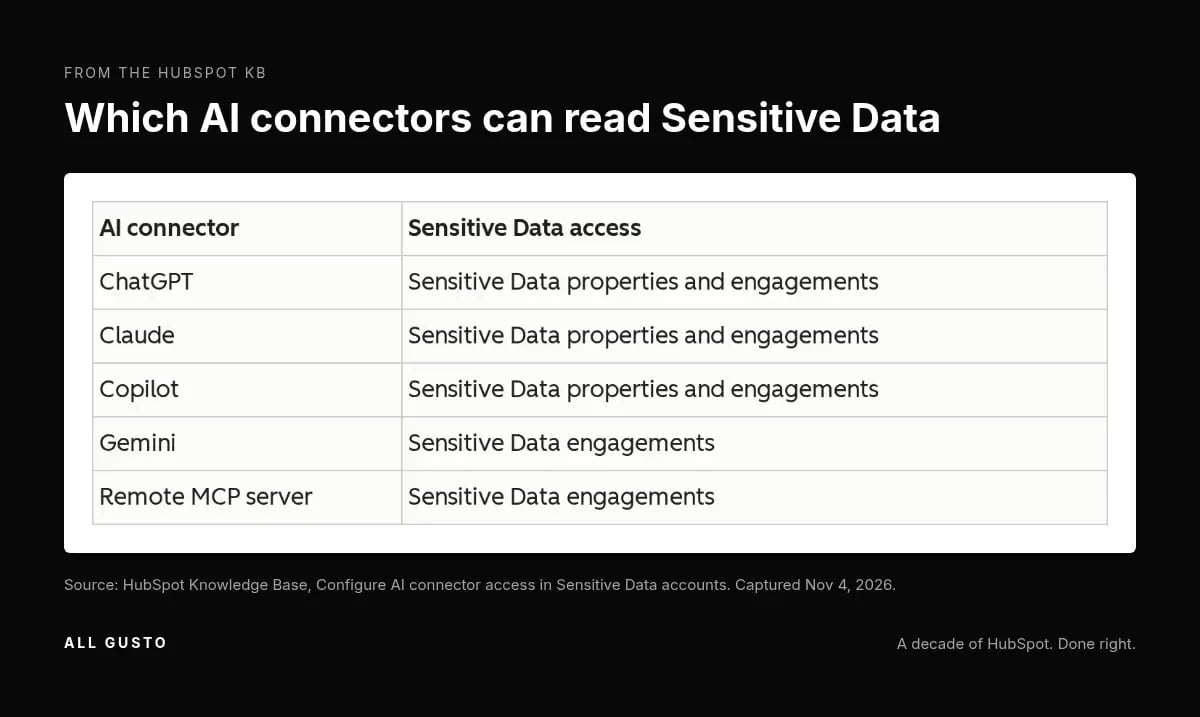
Since Oct 30, 2026, a Super Admin in an Enterprise portal with Sensitive Data on can let ChatGPT, Claude and Copilot read Sensitive Data properties and engagements; Gemini and the remote MCP server read engagements only. That split comes straight from the table in the KB and the rollup.
| Connector | Sensitive Data properties | Engagements |
|---|---|---|
| ChatGPT | Readable after opt-in | Readable after opt-in |
| Claude | Readable after opt-in | Readable after opt-in |
| Copilot | Readable after opt-in | Readable after opt-in |
| Gemini | Not readable | Readable after opt-in |
| Remote MCP server | Not readable | Readable after opt-in |
What stays locked: Highly Sensitive Data properties
The rollup says Highly Sensitive Data properties stay restricted, so whatever you classified at that tier is still out of reach for every connector. If your team has been loose about which fields sit in Sensitive versus Highly Sensitive, that classification is now a real decision.
Object and property permissions still apply
The connectors read what the connected user is allowed to read, and the rollup says object and property permissions still apply. If every rep can see every field because nobody cleaned it up, the AI connector will be just as generous. The Claude connector has other powers too, covered in the Claude connector publishing post.
Five Docs, One Changelog: HubSpot Disagrees With Itself (as of Nov 2)
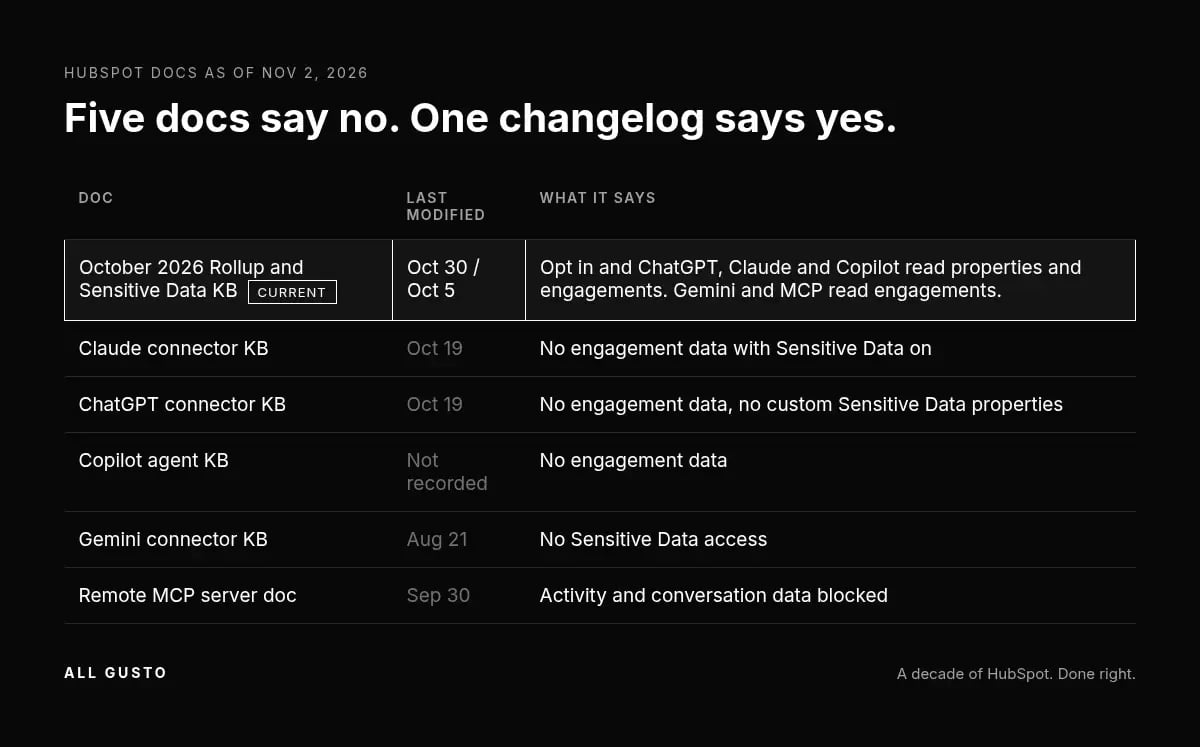
The new rule lives in the Oct 30 rollup and the Sensitive Data KB (last modified Oct 5). Five other HubSpot docs, opened Nov 2, still say the opposite.
| Doc | Last modified | What it says (as of Nov 2, 2026) |
|---|---|---|
| Claude connector KB | Oct 19 | With Sensitive Data on, Claude "will not have access to any engagement data" |
| ChatGPT connector KB | Oct 19 | "ChatGPT cannot access any engagement data"; no custom Sensitive Data properties |
| Copilot agent KB | not recorded | "Copilot cannot access any engagement data" |
| Gemini connector KB | Aug 21 | "Will the HubSpot connector for Gemini have access to Sensitive Data? No." |
| Remote MCP server doc | Sep 30 | Activity and conversation data "will be blocked from access through the MCP server" |
Which page to trust
My rule is that the newest page plus the changelog wins. I re-opened all five on Nov 5. HubSpot edited the ChatGPT and Copilot docs on Nov 4 and both still carry the old rule, so the rollup and the Sensitive Data KB remain the only pages that describe the beta.
The MCP carve-out
The MCP server doc also says its block "does not apply to the standard CRM APIs," which answers the HubSpot Sensitive Data API question: the restriction was always about the MCP server, not every integration. For what the MCP server can change, see my post on MCP schema writes.
Turning It On: Super Admin, Beta Opt-In, Disconnect Twice, Wait Two Hours
Opt in to the beta
A Super Admin opts in to the beta called "Enable AI Connectors for Sensitive Data Portals," per the KB. No one below Super Admin can do it, which is the right call for a setting like this.
Set the access per connector
Then go to Settings, Integrations, Connected Apps, App access and permissions, and choose which connectors get access. I would treat each connector as its own decision instead of one switch for all of them.
Disconnect on both sides, then reauth
This is the step people will skip. The KB and the rollup say you have to disconnect in the AI provider and uninstall in HubSpot, then reconnect, and new permissions can take up to two hours to appear. Nothing showing up five minutes later is not proof it failed. The related reauthorization trap is in the AI write guardrails post.
"Read-Only" Has Teeth: Engagement Writes Get Blocked
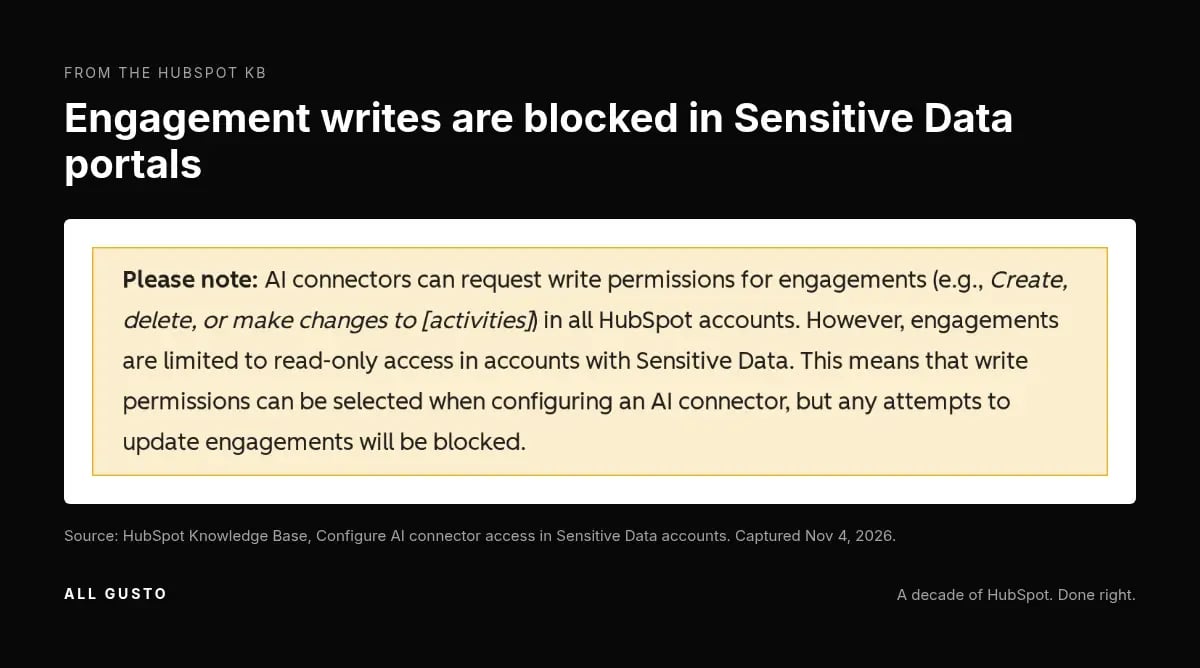
The KB says engagements are limited to read-only access. Write permissions "can be selected," but "any attempts to update engagements will be blocked." So the scope screen will let you tick the box, and the box will not do anything in a Sensitive Data portal.
That matters for teams who use Claude or ChatGPT to log notes or calls back to HubSpot. In a Sensitive Data portal with this beta on, that workflow stops, so plan another route before your reps find out mid-call. If you are already thinking about how to reverse AI changes in general, the undo post covers what HubSpot can and cannot restore.
The Other Gatekeeper Is the Model, Not HubSpot
HubSpot is not the only filter. The KB says Claude "may not return certain CRM properties if the property name is identified as sensitive," and that this is "controlled by the model provider's safety guardrails, not by HubSpot permissions." So you can grant access in HubSpot and still get nothing back for a field because the model decided its name looked sensitive. Property naming becomes a consideration, and a missing field may not be a HubSpot permission problem at all. I have not tested this; it is what the doc says.
Before You Flip It: Scan and Redact
The Review and redact beta
HubSpot has a second beta that belongs in front of this one. The Review and redact KB describes an AI scan of the previous 60 days of activities. You can run it at most once every 30 days, only a Super Admin can run it, and redaction is permanent. Run the scan before you give any connector engagement access, not after.
The open question I would put to your team: what about card numbers or health details someone typed into a note or call log? The docs do not say how free text inside engagements is handled once connectors can read them. I am not claiming it is exposed or safe, only that the scan is the tool HubSpot gives you to look.
You cannot rehearse this in a sandbox
The Sensitive Data in HubSpot tools KB says Sensitive Data is not supported in sandboxes, and the store Sensitive Data KB says categories cannot be removed once turned on. There is no safe dry run, which is why I did not test this hands-on and would not toggle Sensitive Data in any portal just to see what happens.
The Compliance Question You Ask Counsel, Not a Chatbot
The KB says the scope includes "properties that contain HIPAA-protected health data." That is the reason many teams bought Sensitive Data in the first place.
What the docs do not answer is who is covered by which agreement once that data flows to an AI provider, and I will not claim it is compliant when nothing I opened says so. German trade coverage on Oct 30 (agentenwoche.de) raised the same point about data flows to the vendor. Take it to counsel with the KB in hand before a Super Admin opts in. If you need Sensitive Data and permissions set up properly first, that is implementation work, not a toggle.
A 10-Minute Decision Checklist
- List your Super Admins. They are the only people who can opt in and run the scan.
- Run the redact scan. Sixty days of activities, once per 30 days, permanent redaction (KB).
- Audit property and object permissions. The connectors read what the user can read, so audit who can see what in your portal. My AI agents readiness post covers the permission hygiene side.
- Decide which connectors get access. Claude, ChatGPT and Copilot get properties and engagements; Gemini and the remote MCP server get engagements only.
- Plan the double disconnect and the two-hour wait. Tell users when it is happening, and tell anyone logging notes from AI that those writes will be blocked.
- Re-check the five docs. If HubSpot updates them, the rules may have moved again.
Frequently Asked Questions
Can Claude read HubSpot Sensitive Data properties now?
Yes, if your portal is Enterprise, Sensitive Data is on, and a Super Admin has opted in to the beta and granted Claude access. The rollup and the KB both say so. Access is read-only and user permissions apply. The Claude connector KB still says otherwise as of Nov 2.
Can ChatGPT or Claude write notes in a HubSpot Sensitive Data portal?
No. The KB says write permissions can be selected, but any attempts to update engagements will be blocked. If your team logs calls or notes from an AI connector, that stops in a Sensitive Data portal with this beta on. Plan another route for those writes before you turn it on.
Why can't Gemini or the HubSpot MCP server see Sensitive Data properties?
HubSpot's table gives Gemini and the remote MCP server engagements only (KB), and the docs do not explain why, so I will not guess. The Gemini KB still says no Sensitive Data access at all as of Nov 2, which conflicts with the engagements line. Trust the newer page and re-check.
Do I have to reconnect the HubSpot connector after turning this on?
Yes. Disconnect in the AI provider, uninstall in HubSpot, then reconnect, per the rollup and the KB. New permissions can take up to two hours to appear. Schedule it so users are not mid-task when the connector drops.
Is AI connector access to Sensitive Data available on HubSpot Professional?
No. The KB lists Enterprise only, and only for portals with Sensitive Data already on. If you are weighing an upgrade for this, ask the compliance question first, because that is the harder part.
Can I test HubSpot Sensitive Data in a sandbox first?
No. Sensitive Data is not supported in sandboxes (KB), and Sensitive Data categories cannot be removed once turned on (KB). Your preparation is the redact scan, a permission audit, and a clear decision on which connectors get access.
Does Highly Sensitive Data become readable by AI connectors?
No. The rollup says Highly Sensitive Data stays restricted. If you have fields that should never reach an AI provider, check that they are classified at the Highly Sensitive tier before anyone opts in.
If you want a second set of eyes on your portal before a Super Admin opts in, use the contact form on allgusto.com.