If you have a rule in HubSpot that says a deal can't hit Closed Won without a close reason, you probably think that rule protects your pipeline. It protects it from your reps in the HubSpot UI. Whether it protects you from ChatGPT, Claude, the HubSpot MCP server or an old integration depends on which door the write comes through, and HubSpot's own docs don't agree. On HubSpot ChatGPT connector validation, the ChatGPT connector KB says custom validation rules "aren't applied." The Claude connector KB and the remote MCP server docs say they are.
So I built the rule in a demo portal with fake data and threw writes at it through the API. This post covers what each AI path is documented to enforce, what my test proved, what it didn't touch, and the settings I'd change this week. It doesn't cover building your own MCP server or outbound agent toggles.
Three kinds of rule that all get called "validation"
Half the confusion comes from treating every rule as one thing. They're three, and HubSpot enforces them on different paths. Format validation rules govern what a value can look like, such as letters only or a number range. HubSpot's 2023 developer announcement said those would be enforced on API and integration writes starting July 24, 2023, with a 400 on failure. Stage-required fields are conditional property rules: field X becomes required when Deal Stage is Closed Won. The API changelog says those were "UI-only and the API ignored them" until /2026-09/.
Pipeline rules are the third kind: no skipping stages, no moving backward, limits on who edits a stage. The pipeline rules KB says they're enforced via integrations and public APIs "when a user ID is being passed," and the same page lists records "created or edited by API" among the ways to bypass them. Keep these apart when you read the connector KBs, because "pipeline stage validations" there isn't defined. It could mean stage-required fields, pipeline rules, or both.
The documented disagreement: ChatGPT vs Claude vs the MCP server
The ChatGPT connector KB, last updated September 28, 2026, word for word: "Custom validation rules (including pipeline stage validations and association label validations) aren't applied when creating or updating HubSpot records using the connector."
The Claude connector KB, last updated September 24: "When creating or updating records through the connector, conditional property rules and pipeline stage validation rules are applied. This includes property-level conditional option logic and custom pipeline stage validations configured in HubSpot. Association label validations aren't applied." The MCP server docs land on the Claude side: "the MCP server respects conditional field logic, including custom pipeline stage validations."
So two HubSpot-built connectors, documented four days apart, give opposite answers on stage rules and the same answer on association labels. Either the ChatGPT connector really runs on a different write path, or one KB is stale. The ChatGPT page even disagrees with itself: its object table marks custom objects writable, while an FAQ note says custom objects are "not yet available" for associations.
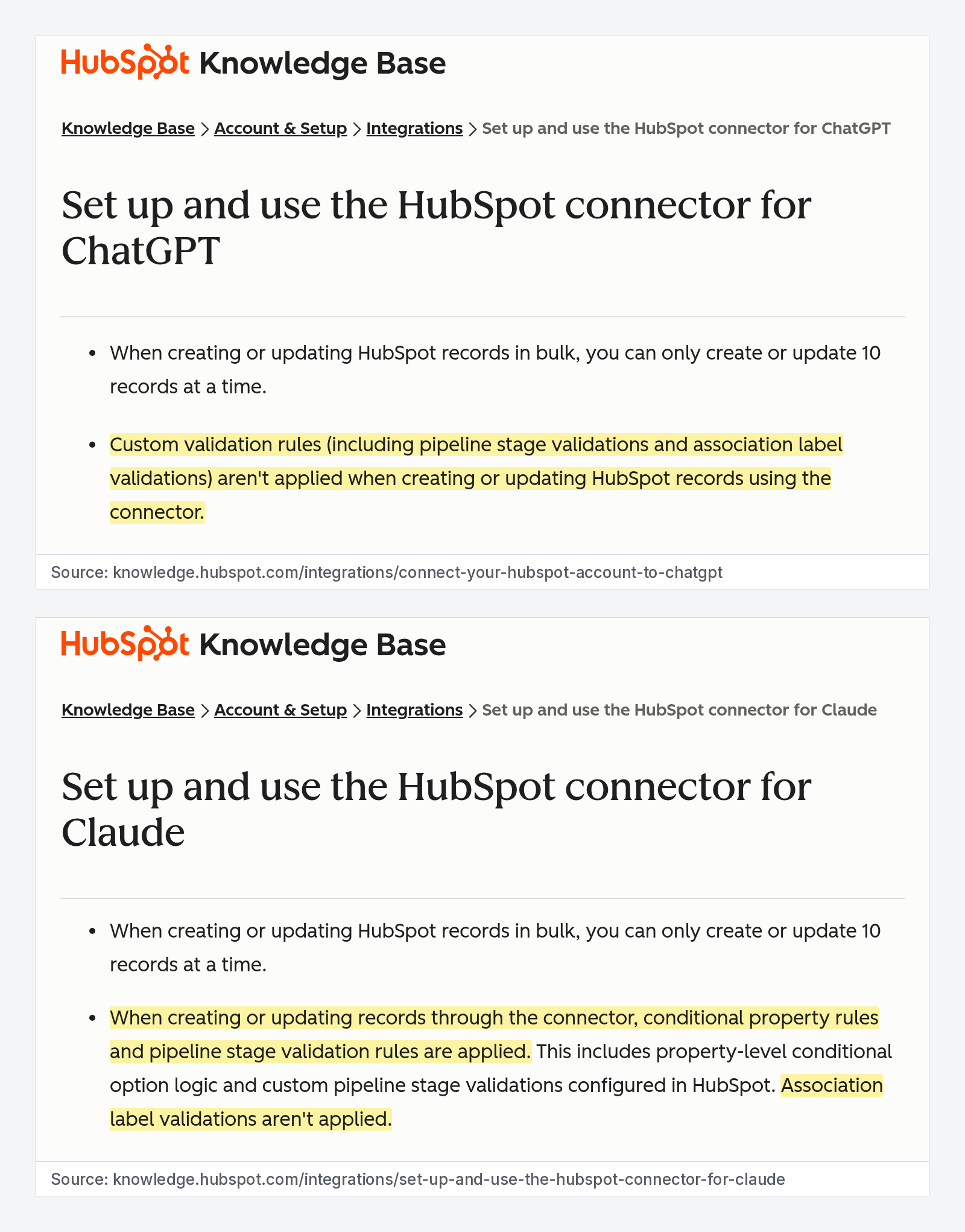
If you've read that Claude writes skip your pipeline stage rules, that came from guides written earlier this year. HubSpot's September Claude KB says the opposite, in plain text. Old guides still rank.
The sandbox test: v3 said 200, 2026-09 said 400
The cleanest fact in this mess is on the developer changelog. In Breaking Change: CRM API Write Validation Enforcement, announced August 11, HubSpot says that starting with /2026-09/, shipped September 8, it "will enforce admin-configured validation rules on all CRM API write paths." That covers conditional required properties, required fields from Create Record settings on POST, and the Edit Associations permission for user-level OAuth apps.
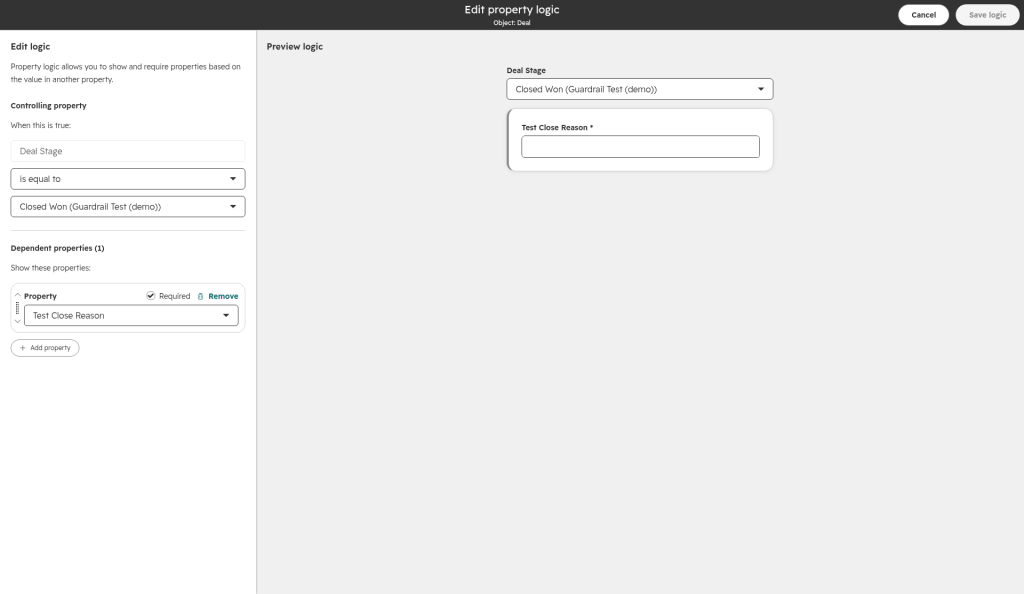
I wanted to see it, not just read it. On October 12, in a demo portal with fake data, I created a test pipeline, a deal property called test_close_reason, and a property logic rule making it required when Deal Stage is Closed Won. Then I pushed a fake deal from Open to Closed Won with the field empty, once on the legacy v3 endpoint and once on /2026-09/. Same key, same deal, same body.
On PATCH /crm/v3/objects/deals/{id}, HubSpot returned HTTP 200. I re-read the deal: Closed Won, hs_is_closed_won true, test_close_reason empty. The UI rule did nothing. On PATCH /crm/objects/2026-09/deals/{id} with the identical body, HubSpot returned HTTP 400 and the deal stayed in Open:
{"status":"error","message":"Property values were not valid: [...]","errors":[{"message":"test_close_reason is required because of a conditional property rule based on [dealstage]","code":"MISSING_CONDITIONAL_REQUIRED_PROPERTY","context":{"propertyName":["dealstage"]}}],"category":"VALIDATION_ERROR"}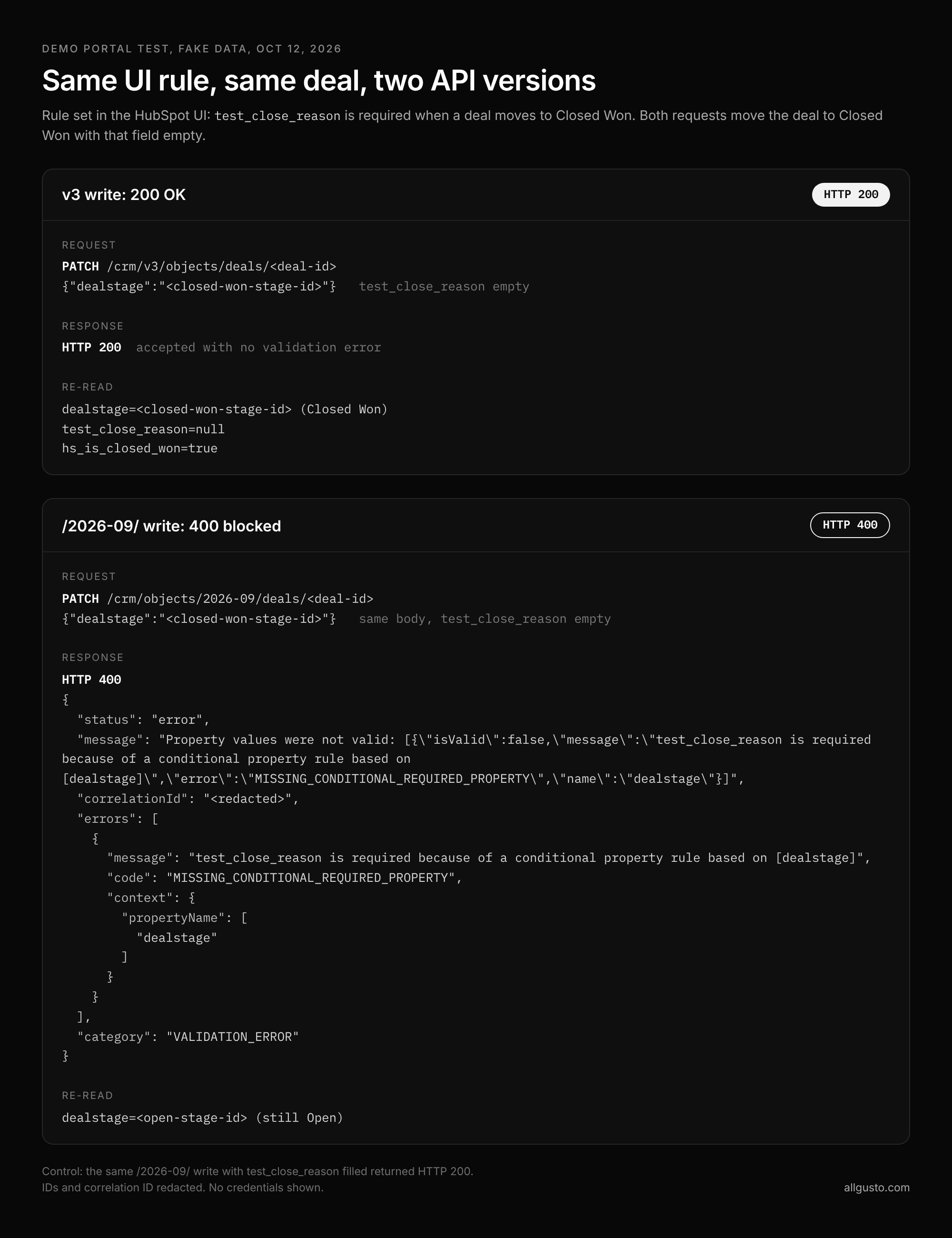
With the field filled in, the same 2026-09 call went through with a 200. The only variable between "ignored" and "enforced" was the version in the URL. This tested one rule type, stage-required fields, through the API only. If you have a script or homegrown agent still calling /crm/v3/, I'd assume your stage-required fields are decoration for that traffic until you've proven otherwise.
The guardrail matrix for RevOps
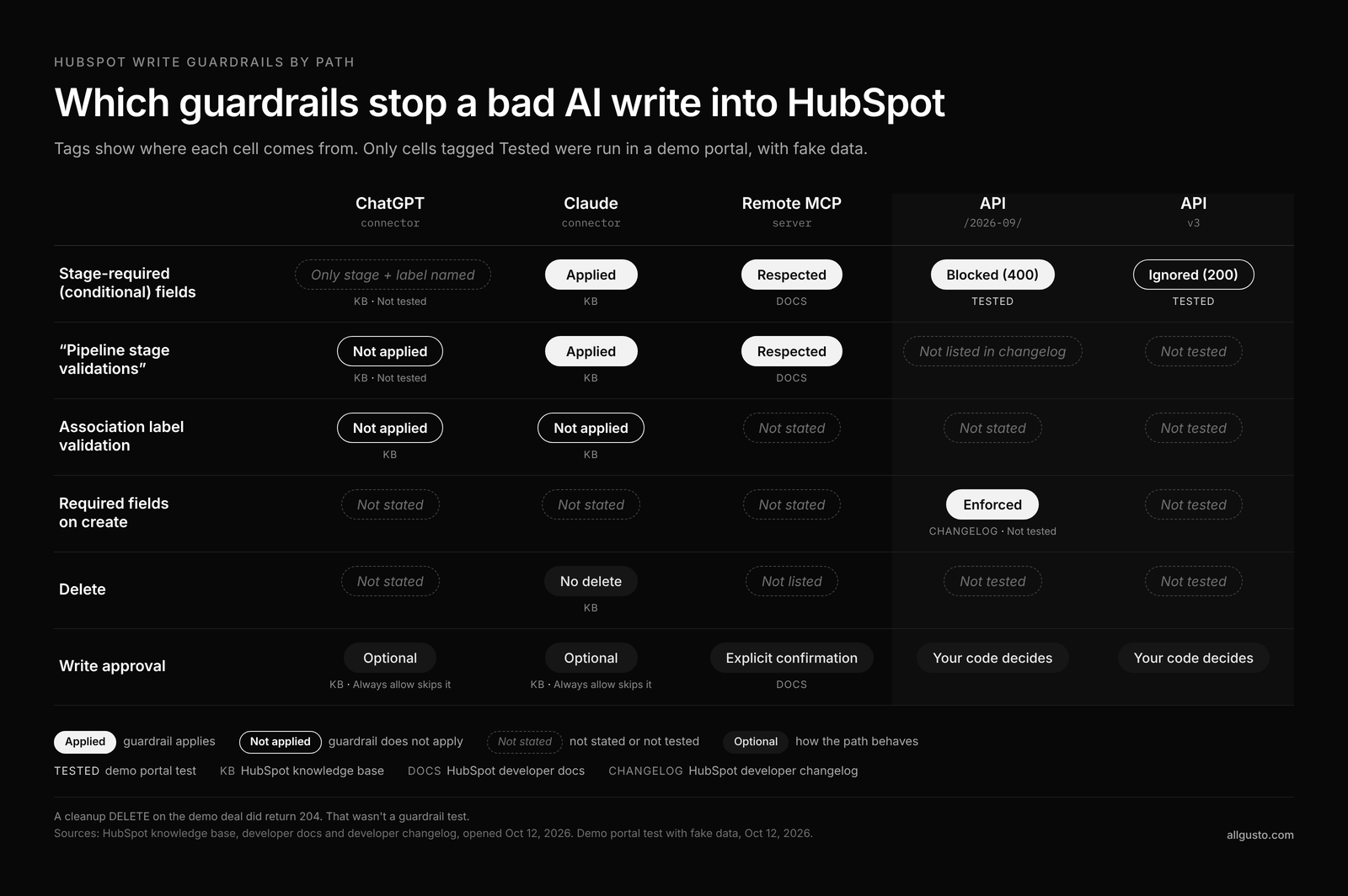
| Guardrail | ChatGPT connector | Claude connector | Remote MCP server | API /2026-09/ | API v3 |
|---|---|---|---|---|---|
| Stage-required (conditional) fields | KB names only pipeline stage and association label validations. Not tested | KB: applied | Docs: respected | Tested: blocked (400) | Tested: ignored (200) |
| "Pipeline stage validations" | KB: not applied. Not tested | KB: applied | Docs: respected | Not listed in changelog | Not tested |
| Association label validation | KB: not applied | KB: not applied | Not stated | Not stated | Not tested |
| Required fields on create | Not stated | Not stated | Not stated | Changelog: enforced. Not tested | Not tested |
| Delete | Not stated | KB: no delete | Not listed | Not tested | Not tested |
| Write approval | KB: optional. Always allow skips it | KB: optional. Always allow skips it | Docs: explicit confirmation | Your code decides | Your code decides |
A cleanup DELETE on the demo deal did return 204. That wasn't a guardrail test.
Here's what I'd do with it this week:
- In ChatGPT and Claude, set Write tools to Needs Approval; both KBs recommend it and warn that with Always allow, "edits may occur without asking for approval."
- HubSpot's Breeze Assistant connector settings use Always allow, Ask permission and Never allow per tool, and that's the right model: Ask by default, Never for pipeline or property changes unless one named admin owns them.
- Find every integration still calling
/crm/v3/and move it to/2026-09/with real 400 handling. If you're moving its auth off a legacy private app at the same time, my service keys post covers that side. - Both connector KBs say writes are attributed in the Audit Log to the user and the connector, so review it.
- Since no AI path in the docs enforces association label validation, check labels with a report, not with hope.
The four assistants are not equal write paths
Before asking which rules apply, check whether the tool writes at all. Per its KB, the Claude connector creates and updates CRM records, and it can also create and update pipelines and create properties. That's data model configuration from a chat window. The ChatGPT connector creates and updates records across contacts, deals, tickets, line items and more. The Claude KB says it can't delete; the ChatGPT KB doesn't say either way. Both cap bulk writes at 10 records.
Copilot and Gemini don't write. The Copilot KB says it "is limited to read-only access" and "doesn't have the ability to create or edit data in HubSpot." The Gemini KB says the same: read-only, contacts, companies and deals, English only, Gemini Alpha required. Roundups claiming Copilot write access contradict that page.
App Governance: scopes look approved, tools stay REQUIRES_REAUTHORIZATION
In a HubSpot Community thread from October 5, a Super Admin reported that the Claude connector could read fine, but every write tool returned REQUIRES_REAUTHORIZATION. Connected apps listed the write permissions, the "Re-authenticate to enable" button wasn't clickable, and reconnecting from Claude changed nothing.
HubSpot's community moderator traced it to scopes "restricted by App Governance rather than Claude's consent screen." The fix: a Super Admin opens Settings, Integrations, Connected Apps, Approved apps, the Claude connector, Manage access, and turns on the write permissions. Then you disconnect and reconnect. App Governance decides whether a connector can write at all, on a different screen from the chat tool's approval setting, so check both. The Manage access to apps KB adds that required data permissions "cannot be modified or turned off."
The admin hole HubSpot already documents
The ChatGPT and Claude KBs use identical words: "Super Admins and users with App Marketplace Access permissions can connect" the connector "without prior app approval." Both also say that if external agencies or consultants hold those permissions, "they can connect" it, and HubSpot's advice is to "review connection attempts in audit logs." It also means anyone holding Super Admin can wire ChatGPT into your deals without asking, including the contractor you gave it to two years ago. A trail is not a gate.
What I did not test
I did not test ChatGPT, Claude or the MCP server. My test hit the REST API with a portal-level key. My MCP connection points at a production portal, so I made no writes through it, and the connector tests need a sign-in I didn't have for that run. Everything above about those paths is HubSpot's documentation, not my evidence.
Two questions stay open. Does a ChatGPT connector write actually skip pipeline stage validations in a live portal, as its KB says? And what path do the connectors write through? It isn't one you build yourself, which is what my custom MCP server post covers. A developer on the HubSpot Community wrote in April that both first-party connectors have access to the same manage_crm_objects write tool via mcp.hubspot.com. If they share a tool, the KB disagreement gets stranger. And in a May thread, a user reported ChatGPT property updates rejected by the tool schema "before HubSpot is called," so not every failed AI write is a validation rule.
FAQ
Does the HubSpot ChatGPT connector apply my validation rules?
HubSpot's KB says no. It states that custom validation rules, including pipeline stage validations and association label validations, "aren't applied" when the connector creates or updates records. I have not tested that live. The Claude and MCP docs say the opposite for their paths, so one page may be out of date. Plan as if the KB is right and keep Write tools on Needs Approval.
Does the Claude connector enforce pipeline stage rules in HubSpot?
HubSpot's September 24 Claude KB says conditional property rules and pipeline stage validation rules are applied, including custom pipeline stage validations. Association label validations aren't. Older guides that say Claude bypasses these rules predate that KB. I haven't tested it live.
Do writes through the HubSpot MCP server follow conditional property rules?
HubSpot's MCP docs say the server "respects conditional field logic, including custom pipeline stage validations," and asks for explicit confirmation before creating or updating records. I made no MCP writes, so this is documented, not verified.
Do HubSpot API integrations still skip required stage properties?
On the legacy v3 endpoint, in my test, yes. A v3 PATCH moved a demo deal to Closed Won with a stage-required field empty and got a 200. The same PATCH on /2026-09/ got a 400 and the deal stayed put.
What does MISSING_CONDITIONAL_REQUIRED_PROPERTY mean in HubSpot?
It's the error code the /2026-09/ API returns when a write breaks a conditional required property rule. The message names the missing property and the controlling one, for example "required because of a conditional property rule based on [dealstage]."
Why do Claude write tools show REQUIRES_REAUTHORIZATION when write scopes look approved?
In the HubSpot Community case, the cause was App Governance, not Claude's consent screen. A Super Admin had to open Approved apps, choose the Claude connector, click Manage access and turn on the write permissions. Then disconnect and reconnect.
Can Copilot or Gemini edit HubSpot records?
Not according to HubSpot's KBs. Copilot is documented as read-only, and Gemini is read-only for contacts, companies and deals.
Can a Super Admin or outside consultant connect ChatGPT without approval?
Yes. Both connector KBs say Super Admins and users with App Marketplace Access can connect without prior app approval, including external agencies or consultants who hold those permissions. The real fix is a shorter list of people with those permissions.
Sources: HubSpot KB and developer pages linked above, re-opened October 17, 2026. Sandbox test run October 12, 2026 at 11:43 AM ET on a demo portal with fake data.
If you want to know which of your integrations and AI tools are writing around your HubSpot rules, use the contact form on allgusto.com.