HubSpot's own KB says two things that belong in the same sentence. In smart data capture, "By default, the checkbox is selected for the Call outcome and Meeting outcome properties," and that checkbox is what decides whether a suggestion is "approved automatically" or waits for a person (Notetaker KB). Meanwhile the KB for HubSpot Restore CRM changes lists four sources you can roll back: CRM changes, Import, Integration and Workflow. HubSpot AI isn't one of them. HubSpot has spent the fall selling a CRM that fills itself in, and the KB is the morning after. That isn't proof the write is stuck. It means the path isn't documented, and you want to know that before the day you need it.
So park the approve-or-automate debate and ask a better question: which undo tool can actually see this write? This post maps HubSpot's change sources to its four undo tools using only HubSpot's KB. It skips validation rules, write toggles, cleanup and deleted records.
Where HubSpot AI writes without a click
Start with HubSpot smart data capture, because that's where the default quietly flipped. In the Notetaker KB (last updated October 19), each smart data capture property has an Automated checkbox that decides whether suggestions are "approved automatically or require manual review," and "By default, the checkbox is selected for the Call outcome and Meeting outcome properties." The Notetaker auto-join checkbox "is selected by default when you turn on Notetaker." So once smart data capture is on, a bot joins, listens, and writes two outcome properties without a rep approving either.
HubSpot deal progression goes further. The deal progression KB (October 12) says it's available on Sales Hub or Service Hub Professional and Enterprise, needs an assigned Sales Seat or Service Seat, and requires a Super Admin to enroll in the "Deal Progression: Next Best Actions and Deal Plans" public beta. Setup lets you "turn on auto-updates," and reviewers get an Approve all button.
One line on money: both KBs say custom properties run through data agent and consume HubSpot Credits, while standard properties don't. The billing side is in my HubSpot credits post.
Whether reps should approve AI suggestions is a fair fight, but it's not this post's fight. Either way, some AI values will land, and some will be wrong.
How HubSpot labels every write: change sources
The good news is that HubSpot tags nearly every write with a name. Per the change sources KB (September 16), HubSpot AI is "AI within HubSpot tools, such as data quality recommendations." Custom Agent shows the agent's name as a link plus who created it. Customer Agent is "by the customer agent," with the configured agent name. Integration is "a connected app." CRM UI is "a manual action in HubSpot."
That label shows up in HubSpot property history. The property history KB (October 16) says you can open View property history on a record and "Search by property name (e.g., Deal Score) or change source (e.g., HubSpot AI)." Detection, in other words, is documented and pretty good.
One honest gap sits right here. Smart data capture is AI inside a HubSpot tool, so HubSpot AI is the obvious label for an auto-approved Call outcome, but I haven't confirmed that in a portal.
Restore CRM changes, property history and Undo cover different sources
Each general undo tool was documented around different sources. In property history, you hover a row, click Restore, then "Restore all changes from this source." Read that button twice. It says all changes from the source, so don't treat it as a one-value fix. The KB is blunt about where it appears: "The restore action is not available on every row. It only appears when the source is a CRM UI edit, import, or workflow." HubSpot AI, Custom Agent and Customer Agent aren't on that list.
HubSpot Restore CRM changes is the bulk tool. Its KB (October 13) says "Super Admin permissions are required to use the restore tool," and you can roll back "to a previous point up to 14 days ago." The intro says it lets you "undo updates made by workflows, imports, or manual edits," which leaves integrations out, but the Source dropdown lists them. It has exactly four options: CRM changes ("manual changes by users in the account"), Import, Integration ("changes by an installed integration app") and Workflow. The tool is on Starter, Professional and Enterprise for the Marketing, Sales, Service, Content and Data Hubs, and Professional and up on Smart CRM. The only beta on the page is exporting a restore summary as a CSV. So it's your HubSpot undo import tool, and the dropdown names none of HubSpot AI, Custom Agent or Customer Agent.
Inline Undo pops up after you edit a field. The Undo KB (October 15) says it "will appear for a short period after a property value change" and that "manual undo actions do not apply to changes made from the following: workflows, API, or connected apps." It's built for the rep who fat-fingers a deal stage.
The map: which undo tool can see which write
Here's the whole thing in one grid, built only from HubSpot's KB. Listed means the KB names the source as covered. Excluded means the KB says the tool doesn't cover it. Not listed means the KB is silent, which is a documentation gap, not a proven failure. Not in scope means the tool only handles one workflow's own changes.
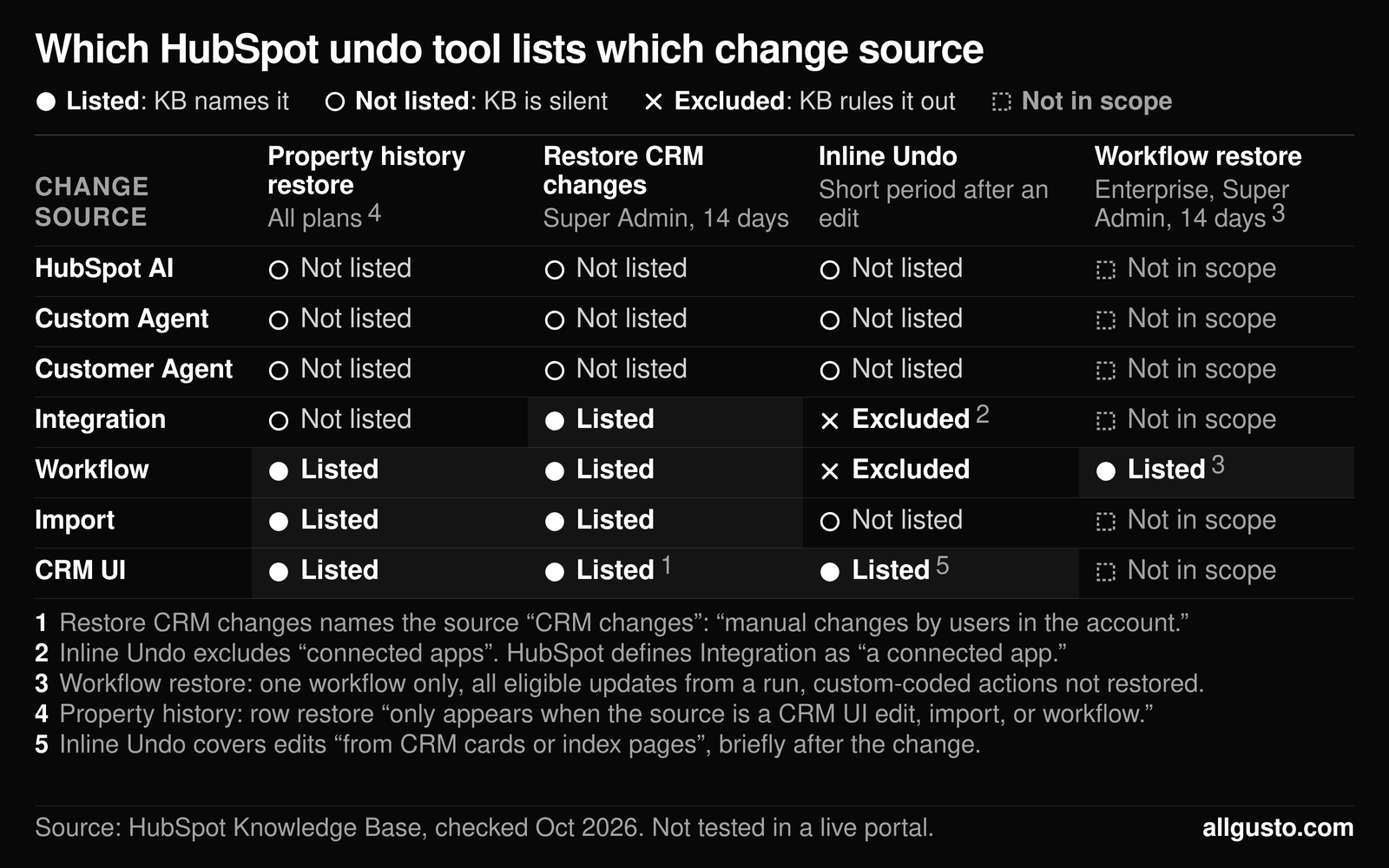
| Change source | Property history restore | Restore CRM changes | Inline Undo | Workflow restore |
|---|---|---|---|---|
| HubSpot AI | Not listed | Not listed | Not listed | Not in scope |
| Custom Agent | Not listed | Not listed | Not listed | Not in scope |
| Customer Agent | Not listed | Not listed | Not listed | Not in scope |
| Integration | Not listed | Listed | Excluded | Not in scope |
| Workflow | Listed | Listed | Excluded | Listed |
| Import | Listed | Listed | Not listed | Not in scope |
| CRM UI | Listed | Listed | Listed | Not in scope |
Notes on the grid:
- CRM UI under Restore CRM changes: the tool calls this source "CRM changes," which it describes as "manual changes by users in the account."
- Integration under Inline Undo: the Undo KB excludes "connected apps," and HubSpot defines Integration as "a connected app."
- The Workflow restore column, and Workflow under it: workflow restore (Enterprise, Super Admin, 14 days) covers one workflow only, restores "all eligible field updates from that run or action," and doesn't restore custom-coded actions.
- The Property history restore column: restore (all plans) "only appears when the source is a CRM UI edit, import, or workflow."
- CRM UI under Inline Undo: Undo covers edits "from CRM cards or index pages," briefly after the change.
Sources, all re-opened October 19, 2026: HubSpot's change sources, View a record's property history, Restore CRM changes, Undo property value changes and Restore workflow CRM property changes.
Look at the top three rows. The sources HubSpot's self-updating CRM most likely writes under are the only rows with no Listed cell. Not listed isn't the same as unrecoverable, since HubSpot may handle these writes under another label or the UI may offer more than the KB says. But if your rollback plan is "Restore CRM changes will catch it," the KB doesn't back you up yet.
Workflow restore has its own rules
The fourth tool lives inside the workflow. The workflow restore KB (September 28) lists it on Enterprise only, says "Super Admin permissions are required," and allows restores "from the last 14 days." Restoring a run or action brings back "all eligible field updates from that run or action, including changes you may want to keep," so it's a sledgehammer, not tweezers. It "will not restore changes made by other impacted workflows," and "Changes made by custom-coded workflow actions will not be restored."
That's where AI writes and workflows tangle. If an AI value enrolls a deal in a workflow that edits more fields, workflow restore covers the workflow's edits, and the AI value that kicked it off is the same Not listed question from the map.
The KB's fallback when restore isn't available is worth stealing for any value no tool lists: export the affected records with record IDs, find the previous values in property history or backups, and import corrected values. Messy records make that harder, which my post on getting HubSpot ready for AI agents covers.
What I couldn't test
I didn't run a live test: no sandbox, no Notetaker test call, no restore attempted on an AI-written value. Everything above is HubSpot's documentation as of October 19, not my evidence.
Three questions stay open. First, what change source does an auto-approved smart data capture value actually get: HubSpot AI, or something else? Second, does either restore tool offer to roll that value back anyway? Third, if an agent runs as a step inside a workflow, does its write carry the Workflow source, which the restore tools list, or Custom Agent, which they don't? The grid also skips one source: the change sources KB lists Data Integration, "a sync from a data integration to the CRM," separately from Integration, and I didn't map it.
You can check the first two without breaking anything. Open a record where Notetaker processed a call, search its property history for HubSpot AI, and hover that row to see whether Restore appears. Then have your Super Admin open Restore CRM changes and click the Source dropdown to see what your portal offers today. Look, don't restore, and save real rollbacks for test records in a sandbox.
Before you tick Automated: the pre-flight check
None of this means leaving every Automated box empty. It means deciding what happens when the AI is wrong before it writes.
- Search property history by source. Check recent records for HubSpot AI, Custom Agent and Customer Agent to see what's already writing.
- Pick the fields you'd never auto-write. Anything that drives commission, forecast, routing or a workflow trigger should lose its Automated tick, including the pre-checked outcomes.
- Back up before you turn on auto-updates. The Undo KB points to HubSpot's back up CRM data tool (Starter, Professional or Enterprise) and to exporting property history.
- Know your 14-day window. Restore CRM changes and workflow restore both stop at 14 days, so a bad value spotted at month-end may be past them.
- Know who your Super Admin is. Both bulk restore tools require one, so if that person left last spring, fix it now.
The prevention side, which rules hold when an AI writes, is in my HubSpot AI write guardrails post. This is the rollback half.
FAQ
Can I undo changes HubSpot AI made to a property?
HubSpot doesn't list it. Property history restore only appears for CRM UI, import and workflow rows, and Restore CRM changes lists CRM changes, Import, Integration and Workflow. HubSpot AI is not on either list. That doesn't prove the change is stuck, so check your portal first.
How far back can HubSpot Restore CRM changes go?
Up to 14 days. HubSpot's KB says you can roll records back "to a previous point up to 14 days ago," and you need Super Admin permissions. The tool is available on Starter, Professional and Enterprise (Professional and up on Smart CRM), and a completed restore stays in Restore History for 90 days.
Does inline Undo work for workflow or API changes?
No. HubSpot's Undo KB says manual undo actions "do not apply to changes made from the following: workflows, API, or connected apps." Inline Undo is for edits on CRM cards and index pages, for a short period after the change.
Which smart data capture properties update automatically by default?
Call outcome and Meeting outcome. HubSpot's Notetaker KB says the Automated checkbox is selected by default for those two properties, so suggestions for them are approved without a manual review unless you clear the box.
How do I find every value HubSpot AI changed on a record?
Open the record, click Actions, and select View property history. HubSpot's KB says you can search by change source, using HubSpot AI as its example, and filter by property, source or date.
Can Restore CRM changes undo changes made by an integration?
HubSpot's KB lists Integration as one of four sources in the Restore CRM changes dropdown, described as "changes by an installed integration app," even though the page intro mentions only workflows, imports and manual edits. It requires Super Admin permissions and is available on Starter and up (Professional and up on Smart CRM). The only beta on the page is the CSV restore summary.
What does HubSpot workflow restore cover?
Changes made by one specific workflow in the last 14 days. HubSpot's KB lists it on Enterprise and says Super Admin permissions are required. It restores "all eligible field updates from that run or action, including changes you may want to keep," and changes made by custom-coded workflow actions will not be restored.
Want your own version of this grid, filled in for the change sources your portal actually uses? Ask through the contact form on allgusto.com.