If someone told you this month that HubSpot is killing private apps and your stomach dropped, breathe. Nothing you already built stops working on October 26. What stops is your ability to build another one the old way.
HubSpot's answer for every script, BI sync and homegrown AI agent after that date is the HubSpot service key. It has one feature I like a lot and one I'd plan around. They're the same feature: the key doesn't belong to anybody.
What ends for HubSpot legacy private apps on October 26 (and what keeps running)
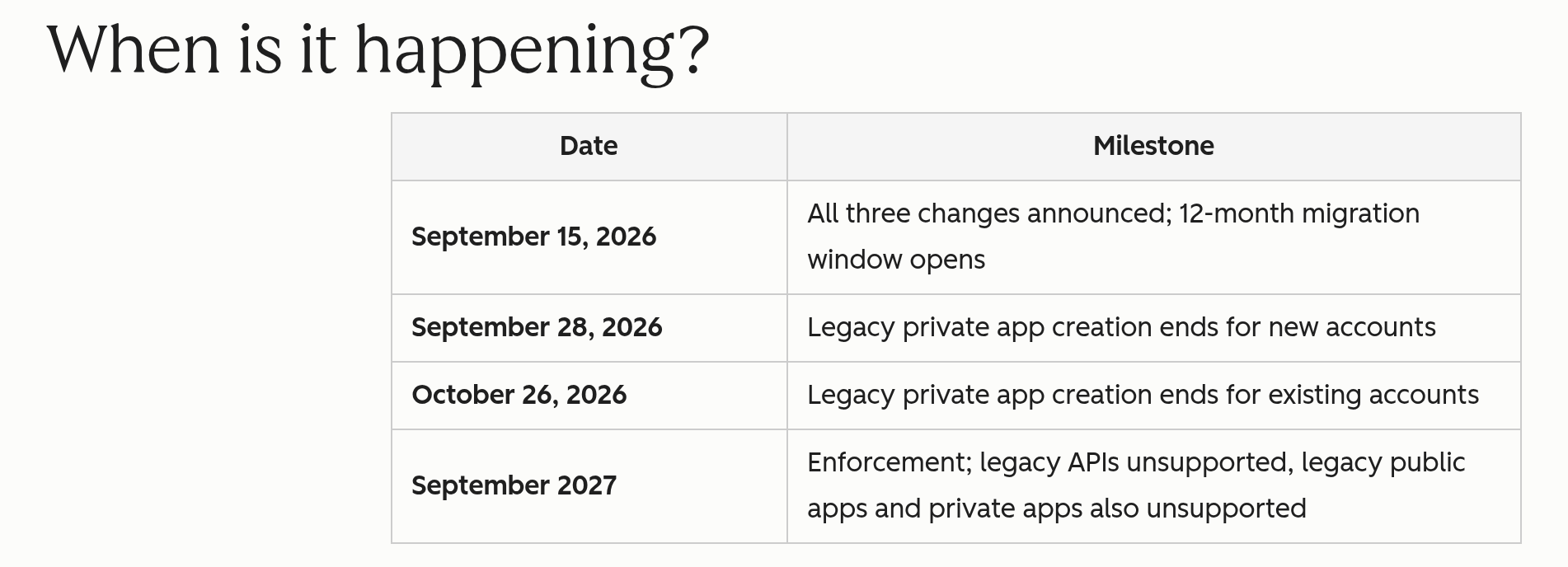
HubSpot announced the change on August 27 in a changelog post called Legacy Private App Creation Being Disabled. There are two dates, and which one is yours depends on how old your account is:
- September 28, 2026 for accounts created on or after September 28. If your portal is that new, the option is already gone.
- October 26, 2026 for every account created before September 28. If your portal existed before then, this is your date.
The scope is narrow. HubSpot is turning off creation of "legacy, non-Project based, private apps through the account UI." That's the old flow where a super admin clicks Create private app in settings and copies a token. HubSpot is blunt about the rest: "All existing legacy private apps continue to work as-is. This change only removes the ability to create new ones."
The date that actually matters for apps you already have is further out. A second changelog post, Legacy APIs and legacy apps: what's going unsupported and when, says legacy private apps must move to Projects-based private apps by September 2027. That's when legacy private apps, legacy public apps and the v1 through v3 APIs go unsupported. So October 26 shuts the front door. The 2027 date is when the old rooms get condemned.
HubSpot service keys in plain English
A service key is an account-level credential for REST API calls. Your script or agent sends it as a Bearer token, the same way it sent a private app access token. HubSpot's service key docs put it under Development > Keys > Service keys. The launch changelog also points to Settings > Integrations > Service Keys. Super admins or users with Developer tools access can create one.
You pick scopes per object, like crm.objects.contacts.read, instead of handing over the whole portal. The limits match privately distributed apps on platform versions 2025.2 and 2026.03. HubSpot's sunset post also lists built-in activity logging, a 7 day grace period on rotation, and key values "restricted to admins by default."
What a service key can't do matters just as much. Per the docs: "You cannot use service keys to authenticate webhooks, make calls within a UI extension, or leverage other developer platform functionality." If your legacy private app listens for webhooks, a service key isn't the replacement. You need a project-based app.
On status: service keys launched in public beta in February, and they were still labeled public beta in HubSpot's Fall 2026 developer release notes. Check the changelog before you put anything critical on one.
One naming note, because it trips people up. A service key is not the old HubSpot API key. HubSpot retired those. Plenty of tutorials still say "API key" when they mean service key, including the walkthrough below. Same thing, wrong name.
Why HubSpot cut the cord to people
The old model had a known failure. Legacy private apps hang off the person who created them. HubSpot's legacy private app docs say that if you remove that user, "some API calls that previously used the app's access token will fail with a result of USER_DOES_NOT_HAVE_PERMISSIONS." The KB article on removing users repeats it for association calls. The listed fixes are to re-create the app, rotate the token, or add the departed user back.
You know how that one goes. Your ops admin leaves, IT deactivates them on a Friday, and on Monday your warehouse sync is half working. Contacts come through. Associations don't. Nobody connects it to the offboarding for a week.
HubSpot's own developer blog admits the pattern: "Private apps in the legacy model often ended up owned by whoever created them." Service keys fix it. From the February changelog: "Integrations continue to function even if the original creator leaves the account. Admins retain access to the Service Key and API access is not tied to an individual employee."
That's a real fix, and I'm glad it exists. Integrations shouldn't die because someone took a new job.
The catch: a key with no person on it
Now look at what HubSpot shipped on the other side of the platform this fall.
Connected apps got a named owner. The connected apps KB article says "Each connected app has an app owner who is the user responsible for managing the integration." Deactivate that owner and HubSpot prompts you to reassign. A monthly digest flags "app ownership risks." HubSpot's MCP server goes further. The Fall 2026 developer rollup says its writes are "attributed in the Audit Log, and actions respect the acting user's permissions."

The service key docs describe a name, scopes, logs, rotation and delete. They don't mention an owner. I can't tell you from the docs whether the UI shows a creator somewhere, or how long the key logs are kept. HubSpot doesn't document either one.
So put the two paths side by side. If your AI works through HubSpot's connector or MCP server, there's a person on every write. If it runs on a service key, you get a label. The fix for "the integration died when the admin left" is "the integration never knew the admin existed." Great for uptime. Less great when every deal amount in a pipeline changed overnight and you're asking who approved it.
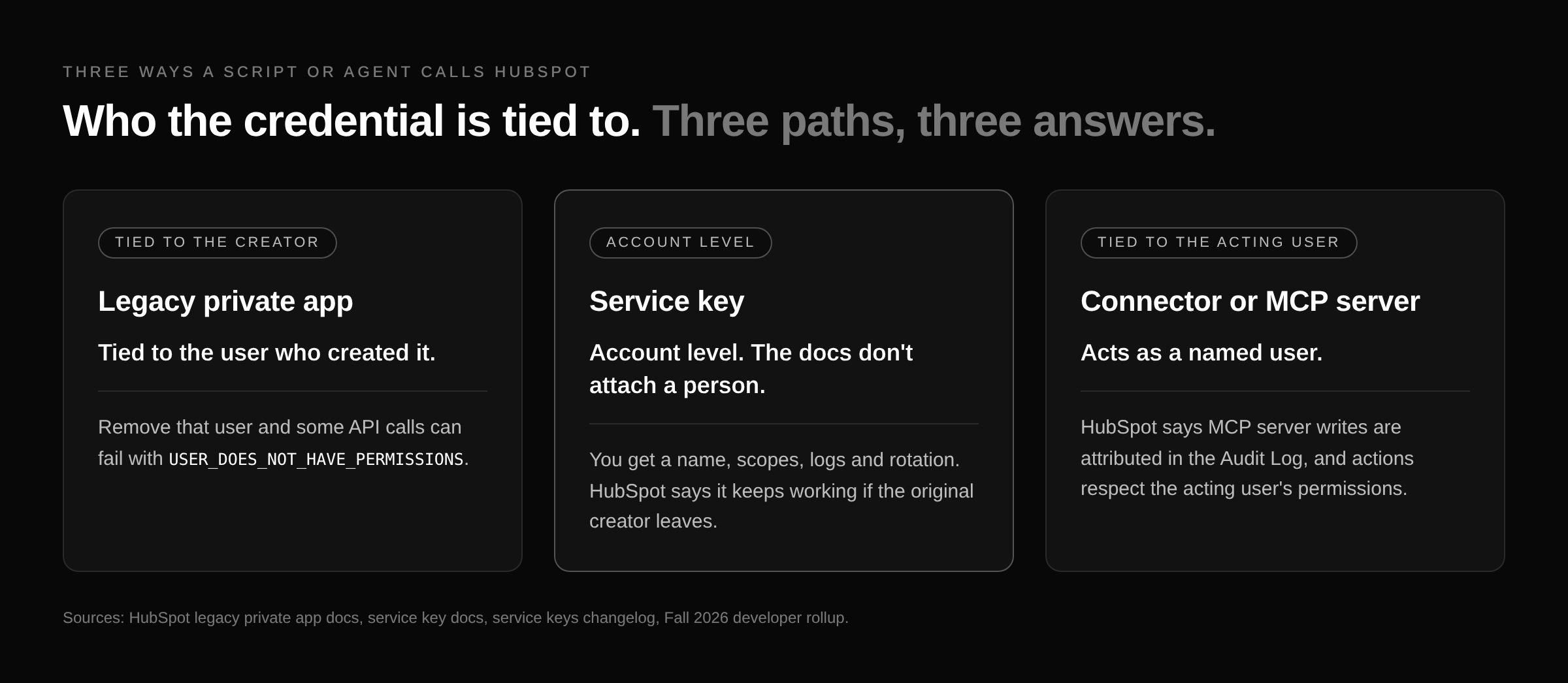
That's the absurd part. HubSpot spent the fall putting names on connectors, and the credential it recommends for "lightweight integrations, internal tools, and AI agent integrations" ships without one. It's a key nobody owns, holding write scopes on your deals.
Public talk about service keys is still thin, mostly developers and agencies. The people who are using them are already running a lot through them. In an r/hubspot thread on multi-portal AI setups, u/dsecareanu2020 wrote:
"Use Claude Code with the agent CLI and API service keys. Each client on a local folder, keys in .env files or even better in the Mac keychain if you're on a Mac."
Another commenter, u/Spotter-Newsletter, put it more simply: "CLI & Service keys let you do anything you want." That's true, and it's exactly the problem. One small account on X named the downside better than I can:
"Audit logs turn into unreviewable noise the second every automated write shares the same blanket service key."
None of that is a breach story. It's a bookkeeping story. HubSpot took a person off the credential, so you have to put one back in your own process.
What to do before October 26
Most of this is HubSpot's own migration checklist from the dev blog. I added what the docs leave for you to handle.
- Inventory every legacy private app. Accounts cap at 20, so the list is short. Write down what each one actually does, not what its name says.
- Pick the path per app. Data-only reads and writes go to a service key. Anything with webhooks or UI goes to a project-based app.
- One key per integration or agent. Don't share one key between your BI sync and your AI agent. When something writes garbage, you want to know which system did it.
- Put the owner in the name. The docs give you a name field and nothing else for ownership, so use it: system, purpose, human owner. Something like
warehouse-sync / nightly deals export / ops lead. Keep the person in a shared doc too, so the name isn't the only record. - Copy the old scopes, then cut them. A key can only get scopes its creator already has. Who creates the key matters, and so does giving it less than that person can do.
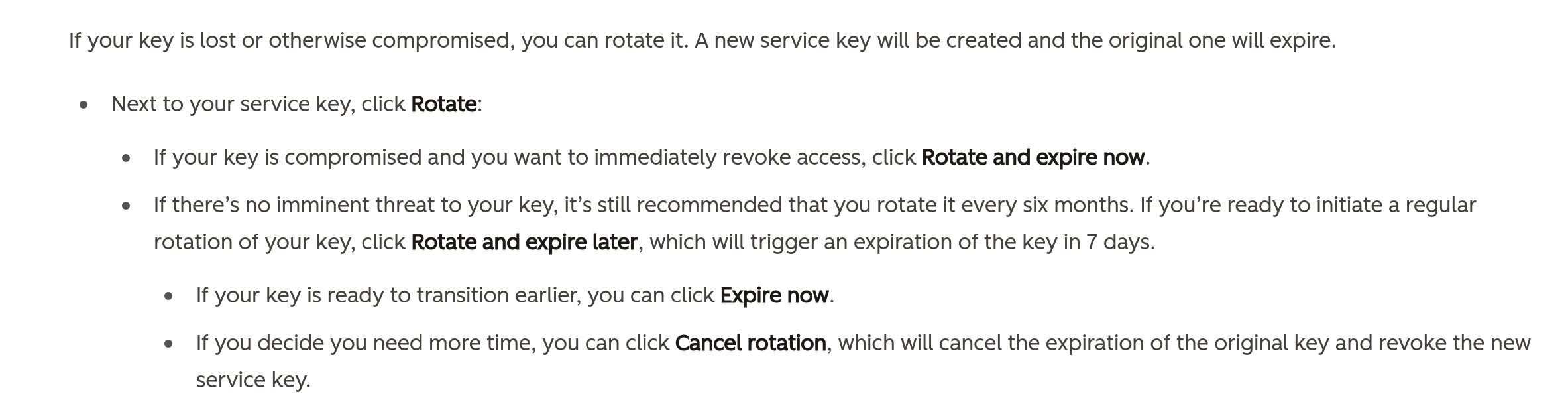
- Rotate every six months. That's HubSpot's number. Use rotate and expire later for the 7 day overlap on a planned rotation. Use rotate and expire now if a key leaks.
- Review logs and last-used dates on a schedule. Delete keys nothing has touched. HubSpot's words, not mine: "stale credentials with broad scopes are a major security liability."
- Test sandbox rebuilds now. In the HubSpot Community migration thread, a customer flagged that after October 26 you can't re-create legacy private apps in a refreshed sandbox. Another practitioner's advice: "I'd include credential recreation in the migration test, not just whether the new endpoints work."
- Run old and new in parallel, then retire the legacy token. Don't leave the old one alive "just in case." That's how you end up with two keys and zero owners.
Which tools already take a service key
Some of your stack has already moved.
- Airbyte merged a docs change on September 16 saying a HubSpot service key works in the existing private app access token field. Their test synced 35 streams and 348,069 records.
- n8n lists "Service key (recommended)" for its HubSpot node and calls UI-based private apps legacy.
- Make's native HubSpot app documents OAuth only. In a 2025 community thread, a user asked for token auth to avoid "key person risk," and Make staff pointed token users to the HTTP module.
If your scripts still call /crm/v3/ paths, that's a separate September 2027 problem. Swapping the credential doesn't fix it.
If you're wiring AI into HubSpot from more than one direction, it helps to know which ones act as a person and which don't. I've covered the write toggles in HubSpot's own agents, building your own MCP server for Agent Builder, and what the Claude Sales Plugin writes to your CRM.
FAQ
Do my existing HubSpot private apps stop working on October 26?
No. HubSpot says existing legacy private apps "continue to work as-is." October 26 only ends creating new ones in the account UI. Legacy private apps go unsupported in September 2027.
When does the cutoff hit my portal?
September 28, 2026 if your account was created on or after that date. October 26, 2026 if it was created before.
What is a HubSpot service key?
An account-level credential for HubSpot's REST APIs, sent as a Bearer token and scoped per object, like crm.objects.contacts.read.
Can a service key receive webhooks?
No. Service keys can't authenticate webhooks or UI extensions. If you need either, build a project-based app.
Who can create a service key, and what scopes can it get?
Super admins or users with Developer tools access. A key can only get scopes the person creating it already has.
What happens to a service key when the person who created it leaves?
It keeps working, and admins keep access. That's the point of service keys. It's also why you should put a human owner in the key name and review keys on a schedule.
How often should I rotate a service key?
HubSpot recommends every six months. Rotate and expire later gives you 7 days to swap the key everywhere it's used.
Should my AI agent use a service key or HubSpot's connector or MCP server?
It depends on whether you need a person accountable for each write. HubSpot says its MCP server writes are attributed in the Audit Log to the acting user, with that user's permissions. A service key works at the account level.
Do n8n and Airbyte support service keys?
Yes. n8n recommends them, and Airbyte confirmed a service key works in its private app token field. Make's native HubSpot app documents OAuth only.
Are HubSpot service keys generally available?
They launched in public beta in February 2026 and were still labeled public beta in HubSpot's Fall 2026 release notes. Check HubSpot's developer changelog for the current status.
Related
Primary sources: Legacy Private App Creation Being Disabled (HubSpot changelog, August 27, 2026), Legacy APIs and legacy apps: what's going unsupported and when (HubSpot changelog, September 15, 2026), Service keys (HubSpot changelog, February 10, 2026), and HubSpot service key docs (opened October 6, 2026).
If you want a second set of eyes on your legacy private apps before October 26, use the contact form on allgusto.com.