Copilot was the only one of HubSpot's big AI connectors that couldn't touch your CRM. As of Nov 4, it can. HubSpot updated the KB for the HubSpot Agent for Copilot, which is the HubSpot Copilot connector for Microsoft 365, and the page now says Copilot can "create and update CRM records, and log activities" without anyone switching over to HubSpot (HubSpot KB). That makes three of HubSpot's four big AI connectors writers. The catch: the ChatGPT and Claude KBs say whether validation rules apply, how many records one request can change, and how writes show up in the Audit Log. The Copilot KB says none of that. This post covers what the HubSpot Copilot integration can write, the two admins who have to approve it, how its rules compare, and what I would set up first. It does not cover Sensitive Data access, the Gemini connector, or undo, which have their own posts.
Copilot Just Stopped Being the Read-Only One
Until last week, the HubSpot Agent for Copilot could read your CRM and could not change it. I said as much in my Oct 19 post on AI write guardrails: Copilot and Gemini don't write. That was true until HubSpot edited the Copilot KB on Nov 4, and I have corrected the Copilot lines in that post. If you approved Copilot because it was read-only, you approved a different product.
The KB edit landed the same day as HubSpot's Q3 earnings call. On that call, HubSpot's CEO said customers created "over 22 million CRM objects through connectors" in the quarter, "up 157% quarter-over-quarter," and HubSpot called itself the "first CRM to connect with all 4 leading frontier models" (call transcript via The Motley Fool). Those are HubSpot's numbers, and I am not reading cause and effect into them. They do show where HubSpot is pointing: connectors that change records, not just read them. Copilot was the holdout. It isn't anymore.
What the HubSpot Copilot Connector Can Write, and What It Still Can't
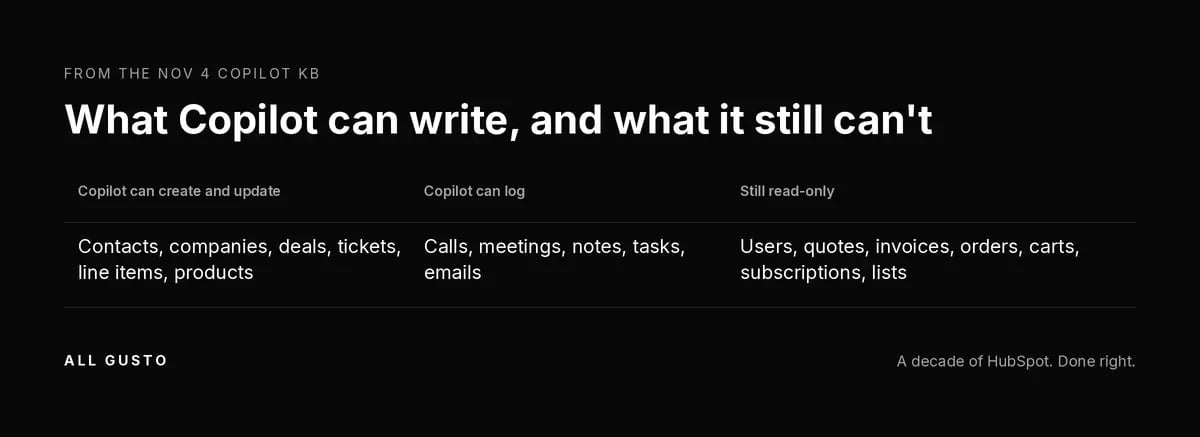
The Nov 4 KB has a table, and it is the most useful thing on the page. The HubSpot Copilot connector can create and update six CRM objects and log five kinds of activity: calls, meetings, notes, tasks and emails. Everything else, it can only read. Here is the split as HubSpot documents it (KB).
| Copilot can create and update | Copilot can log | Still read-only |
|---|---|---|
| Contacts, companies, deals, tickets, line items, products | Calls, meetings, notes, tasks, emails | Users, quotes, invoices, orders, carts, subscriptions, lists |
Read the read-only column carefully. Quotes and line items sit on different sides of the line, so a Copilot user can change the line items on a deal while the quote stays read-only. Lists are read-only too, so Copilot can update a contact but cannot change a list. That is fine if your reps know it, and a mess if they assume Copilot did the whole job.
Line items being writable matters more than it looks. If your revenue reporting runs off line items on deals, a Copilot user can now change the numbers those reports read. That is a reason to know who has edit rights on deals and line items before you turn it on, not a reason to block it.
Two Admins Have to Say Yes
The first gate sits with your Microsoft 365 admin. Per the KB, they go to Agents, All agents, HubSpot, choose Unblock, and pick an install scope. One of those choices, "All users in the organization can install," installs the agent for everyone automatically. That is a big default for a tool that now writes, and your Microsoft admin can choose it without ever opening HubSpot.
The second gate is in HubSpot. A Super Admin, or a user with App Marketplace access, authorizes the agent and picks its permissions (KB). After that, the KB says users can only edit what they can already edit in HubSpot. That last line is the real control. Copilot's writes ride on each user's HubSpot permissions, so a rep with edit rights on every deal now has a faster way to use them. Copilot did not create loose permission sets, but it will find them.
One more limit for anyone who runs more than one portal. The KB says a Copilot account connects to one HubSpot account at a time, and switching is manual. If you run several brands or portals, decide which portal each person connects to and tell them, because a write goes wherever the connection points.
Three Connectors, Three Rulebooks, One Blank Page
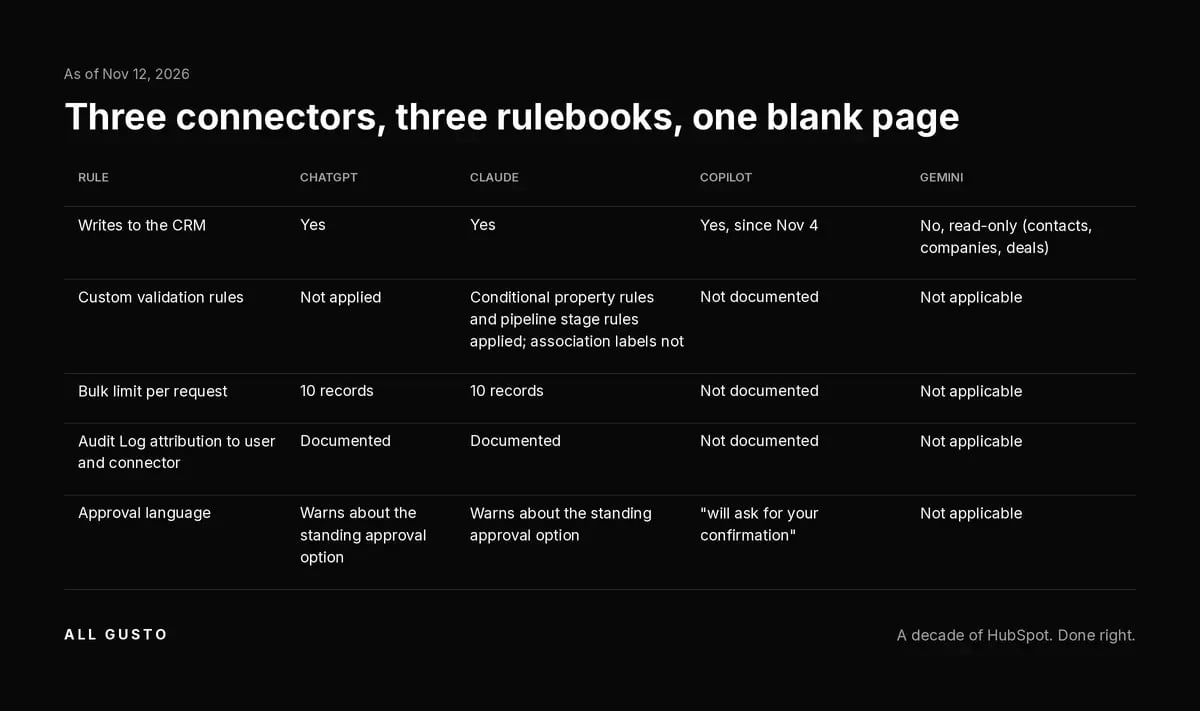
ChatGPT and Claude got write access before Copilot did, and their KBs got rules to match. Copilot's KB did not. Here is how the three writing connectors and Gemini compare on the rules HubSpot has written down, as of Nov 12, 2026.
| Rule | ChatGPT | Claude | Copilot | Gemini |
|---|---|---|---|---|
| Writes to the CRM | Yes | Yes | Yes, since Nov 4 | No, read-only (contacts, companies, deals) |
| Custom validation rules | Not applied | Conditional property rules and pipeline stage rules applied; association labels not | Not documented | Not applicable |
| Bulk limit per request | 10 records | 10 records | Not documented | Not applicable |
| Audit Log attribution to user and connector | Documented | Documented | Not documented | Not applicable |
| Approval language | Warns about the standing approval option | Warns about the standing approval option | "will ask for your confirmation" | Not applicable |
Sources: ChatGPT connector KB, Claude connector KB, Copilot KB, Gemini connector KB.
The pattern is hard to miss. Where ChatGPT and Claude have a sentence, Copilot has a blank. A blank is not a no. Nothing on the Copilot page says it skips validation rules, ignores a 10-record limit, or writes without an Audit Log entry. You are planning around an unknown, not a rule.
Say your sales process depends on a pipeline stage rule that requires a property before a deal moves forward. The Claude KB says pipeline stage rules are applied. The ChatGPT KB says custom validation rules are not. For Copilot, you either find out on a test record or plan for the worse answer until HubSpot fills in the page. Gemini is still the read-only one, and the Google admin side of that story is in my Gemini connector post.
"Copilot Will Ask" Is the Guardrail on Paper. Microsoft's Connector Is a Separate Surface.
The one write rule the Copilot KB does state is confirmation. In HubSpot's words, Copilot "will ask for your confirmation" before it creates or updates a record (KB). That is the guardrail on paper. The page says nothing else about how that prompt behaves, so plan the rest of your controls around permissions.
Where it gets confusing is that Microsoft has its own HubSpot connector. Microsoft 365 Copilot's federated connectors gallery lists HubSpot next to Clarify and Intercom, and Microsoft's federated connectors overview documents approval choices per tool: allow once, allow for the conversation, or a standing approval for that tool. Microsoft's Message Center notice MC1476316, mirrored at mc.merill.net, moved general availability for federated write actions from early to late October 2026 and says approval is on by default. Researcher stays read-only there.
These are two different surfaces: the HubSpot Agent for Copilot is HubSpot's app, and the federated HubSpot connector is Microsoft's. HubSpot's Agent KB does not mention Microsoft's approval choices at all, which leaves admins with one open question: does Microsoft's "Always allow" option reach the HubSpot Agent, or only the federated connector? The docs do not answer that. Ask your Microsoft 365 admin which of the two your tenant has turned on.
The Copilot KB Still Argues With Itself
HubSpot added the write table on Nov 4 but did not clean up the rest of the page. The same KB still says "It has read access to standard CRM records," a line written for the read-only version, a scroll away from the table that says it writes (KB). The page also still carries the Sensitive Data block saying Copilot gets no engagement data when Sensitive Data is on. That conflicts with the opt-in beta HubSpot announced Oct 30, which lets Copilot read Sensitive Data properties and engagements in Enterprise portals where a Super Admin opts in. I covered that beta, and the docs that still disagree with it, in the Sensitive Data post. When one page disagrees with itself, trust the newer section and re-check before you act.
Before You Let Reps Loose
None of this is a reason to block Copilot. It is a reason to turn it on in order. Here is the order I would use.
- Pick the install scope on purpose. Do not choose "All users in the organization can install" on day one. Start with a named pilot group and widen it once the rest of this list is done (KB).
- Audit HubSpot edit permissions for the pilot group. Copilot users can edit what they can already edit in HubSpot, so check edit rights on deals, line items and owner fields for that group first.
- Make your rules real in HubSpot, then test whether Copilot respects them. Set the required properties and pipeline stage rules you depend on, then test whether a Copilot write on a test record follows them. Compare what you see with what the Claude KB and ChatGPT KB document, since the Copilot KB does not say.
- Review property history for a week. Once the pilot starts, check property history on the records the pilot group touches, and catch surprises before you widen the scope.
- Decide which writes stay in workflows. Stage changes that trigger automation and owner reassignments are better left to workflows you control. If something does go wrong, my post on restoring CRM changes made by AI covers what HubSpot can undo and what it cannot.
Frequently Asked Questions
Can the HubSpot Copilot connector edit HubSpot records?
Yes, as of HubSpot's Nov 4 KB update. The HubSpot Agent for Copilot can create and update contacts, companies, deals, tickets, line items and products, and log calls, meetings, notes, tasks and emails (KB). Users, quotes, invoices, orders, carts, subscriptions and lists stay read-only. HubSpot says Copilot will ask for your confirmation before it creates or updates a record.
Does Copilot respect HubSpot validation rules?
HubSpot's Copilot KB does not say, as of Nov 12, 2026. The ChatGPT KB says custom validation rules are not applied. The Claude KB says conditional property rules and pipeline stage rules are applied, and association labels are not. Silent is not the same as no. Test whether Copilot respects your rules on a test record in a portal you control.
Can Copilot write quotes or lists?
No. Quotes, lists, users, invoices, orders, carts and subscriptions stay read-only in the Copilot KB. Quote and list work still happens in HubSpot. Line items are writable, though, so a Copilot user can change the line items on a deal even while the quote itself stays read-only.
Do I need a Microsoft 365 admin to use Copilot with HubSpot?
Yes. Per the KB, a Microsoft 365 admin has to unblock the HubSpot agent under Agents, All agents, HubSpot, and choose an install scope before anyone authorizes it in HubSpot. Then a HubSpot Super Admin or App Marketplace user authorizes it and picks permissions. Talk to both admins before the pilot, not after.
Can I connect more than one HubSpot portal to Copilot?
Only one at a time. The KB says one HubSpot account per Copilot account, and anyone working across several portals, such as agencies and multi-brand teams, switches manually. The write goes to whichever portal is connected at the time, so make sure people know which one that is.
Can Copilot see engagement data when HubSpot Sensitive Data is on?
The Copilot KB still says no. It carries a block saying Copilot gets no engagement data when Sensitive Data is on (KB). HubSpot's Oct 30 opt-in beta says Copilot can read Sensitive Data properties and engagements in Enterprise portals where a Super Admin opts in. The two do not match. My Sensitive Data post covers the beta; re-check both pages before you rely on either.
Sources: HubSpot Agent for Copilot KB (last updated Nov 4, 2026); HubSpot ChatGPT connector KB (Nov 6, 2026); HubSpot Claude connector KB (Nov 6, 2026); HubSpot Gemini connector KB (Aug 21, 2026); Microsoft federated connectors overview (Oct 19, 2026); MC1476316, Message Center archive mirror; HubSpot Q3 2026 earnings call transcript, The Motley Fool (call held Nov 4, 2026). All opened Nov 12, 2026.
If you want a second set of eyes on your HubSpot permissions before Copilot starts writing, use the contact form on allgusto.com.