HubSpot now gives every custom agent its own login. A HubSpot agent user is the identity HubSpot creates for each agent you build in the agent builder, and it sits in Users & Teams next to your people, with its own roles and its own permissions. In my test, its name also showed up in the property history of the record it changed, though the Audit Log credited me, not the agent. It doesn't count toward your paid seats. But it covers agents built inside HubSpot, and only those. Claude, ChatGPT and Copilot still reach your portal as whoever connected them, so admins now run two kinds of AI access with two sets of controls. This post covers what shipped, the defaults, what the audit trail shows as of Nov 25, 2026, what HubSpot hasn't answered, and what I'd set first. It does not cover Customer Agent or pricing.
What a HubSpot Agent User Is
Becca Stamp, a HubSpot product manager, announced it the week of Nov 16 in a LinkedIn post: "Starting today, every Custom Agent in HubSpot is an Agent User. You manage it the way you manage your human team." HubSpot's CTO, Dharmesh Shah, put it more bluntly in his own post: "We have agentic users. Admins provision them just like regular users." If you haven't built one yet, my agent builder post covers where custom agents come from.
The line worth reading twice is about the ceiling. Stamp writes, "Permissions cap what an agent can reach. Its actions, knowledge, and connectors still define what it can do inside that ceiling." HubSpot's agent builder KB gives the example: a deal pipeline analysis agent with Deals View and Edit permissions "cannot edit deal records without the Write to my HubSpot records action turned on and instructions to make CRM changes."
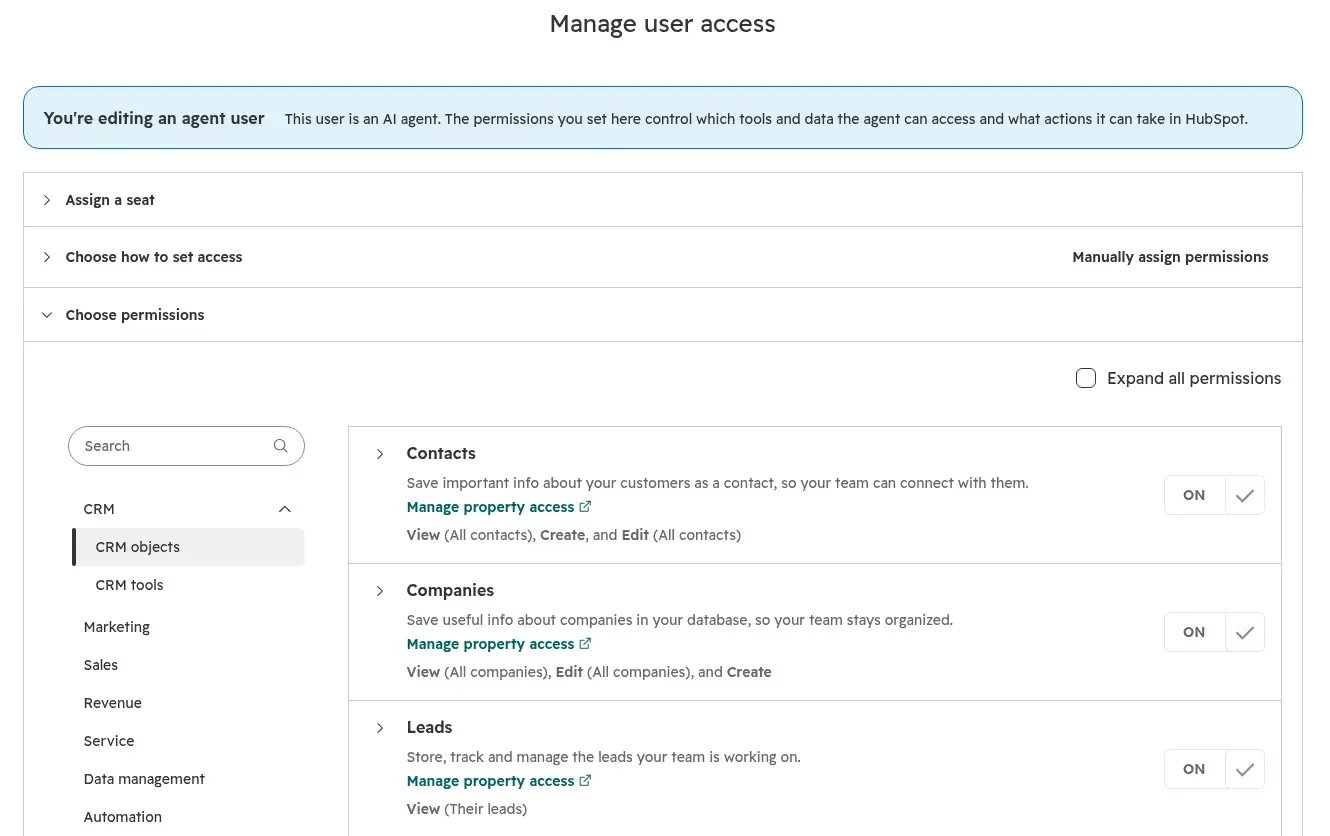
Default HubSpot Custom Agent Permissions, and Who Can Change Them
Start with the default, because most agents will never leave it. The KB says, "By default, the agent can access baseline functionality across your HubSpot account." Across your account is broad, and the KB doesn't list what baseline includes. To move an agent off that default you need Super Admin or the Add and edit users permission, and applying a permission set to an agent requires an Enterprise subscription.
Run access has its own default, and HubSpot's docs disagree with themselves on it. The KB says, "By default, Super Admins can edit agents and all users can run them," but its own steps start from a button labeled "Only admins can run," and a fresh test agent I set up showed exactly that, with only owners and Super Admins able to edit and run. Read each agent's setting instead of trusting either. The options are owners and Super Admins only, owners and Super Admins edit while everyone runs, everyone edits and runs, or custom teams and users who can run, or run and edit. There is one built-in check: if an agent's configuration relies on features a user doesn't have, such as blog or landing pages, that user can't run it, even with run access.
In a test agent I set up, the permissions summary showed 12 CRM objects and 39 tools, with View, Create and Edit on contacts, companies, deals and tickets, and no Delete anywhere. That is what baseline across the account looked like there, and it is a lot of reach for an agent whose only job was a two sentence, read-only summary.
What the Audit Trail Shows as of Nov 25, 2026
HubSpot's claim, from Stamp's post, is that "Agent activity shows up in the Audit Log under the agent, just like a human user. Filter by agent, see the before and after values, and see exactly what changed and when." So I ran one. In a demo portal, a test agent set the job title on one test contact. The contact's property history named both sides: the source read "Custom Agent," then the agent's name, then "by" and my name, with the agent's instance ID in the tooltip. HubSpot's change sources KB, last updated Sep 16, says that source "will also show who created the agent." In my test I built the agent, owned it and ran it, so I can't tell you yet which of those the "by" line names.
The Audit Log told a different story. The same change was logged under me, and none of the visible columns named the agent. Publishing, running and unpublishing the agent made no entries, and neither did creating or editing it. Granting and removing admin permissions on the agent user was credited to me too. As of Nov 25, 2026, HubSpot's audit log KB doesn't list custom agents or Agent Users as an actor either. That is one run in one portal, not proof the feature is missing, so make one test change in your own portal and check both places before you rely on either. Stamp's post also says you can restore the previous value right from the audit entry, and my restore CRM changes post covers what HubSpot's other undo tools can and can't see.
What Agent Users Don't Cover: Claude, ChatGPT and Copilot
Stamp's post says "every Custom Agent," which means agents built in HubSpot. It says nothing about the AI tools most teams connected first. The connectors in Claude, ChatGPT and Copilot work inside the HubSpot permissions of the person who connected them, as I mapped in the seven AI doors post. There is no agent user for those, so your loosest human permission set is still your loosest AI policy. My Copilot connector post and AI write guardrails post cover how to tighten those human permissions. If your reps are also working from HubSpot inside Claude's sidebar, my Claude Cowork post covers that door.
So an admin now has two control panels. A HubSpot-built agent has its own user, its own permissions and, in my test, its own name in the property history of the records it changes. A Claude, ChatGPT or Copilot session borrows a person's user and that person's permissions.
What HubSpot Hasn't Answered Yet
A commenter on Shah's post asked the two questions I would have asked: "When a person triggers an agent, does the audit log record who asked, as well as which agent acted? And can the agent do more than that person could, since it has its own permissions?" As of Nov 25, 2026, I don't see an answer in the thread. My test answers part of the first one. The record's property history named the agent and a person, and the Audit Log named only the person. Because one person built, owned and ran that agent, I can't yet say whether the record names the person who asked or the person who built it. The KB's feature check stops a user from running an agent that needs tools they lack, but it says nothing about records they can't see. Once you open run access to everyone, that second question matters most.
What I'd Set First
I've been configuring HubSpot portals since 2014, and new permission models tend to ship with broad defaults that nobody revisits. Here is what I'd do this week, in this order.
- Open every agent user in Users & Teams and read its defaults. Baseline access across the account is fine for a summary agent and wrong for one that writes. Cut each agent down to the objects its job touches.
- Narrow run access. Check each agent's run setting, and if it lets everyone run, move any agent that writes to a custom team. That keeps the open "who asked" question small while HubSpot answers it.
- Pick each agent's owner on purpose. The KB lets you change the owner from the access panel, and the panel says "The owner's identity is used for all workflow executions, API calls, and automated replies triggered by this agent." Treat the owner as the person accountable for the agent, and change it when that person leaves.
- Test in a sandbox before production. Run one agent, make one change, then look for it on the record's property history and in the Audit Log, and expect the log to show the person, not the agent. In my test portal, the agent couldn't run, not even as a test, until the portal-wide AI setting for file data was on, and it couldn't be published until a test had run. That setting covers the whole portal, so decide on it before you test. Don't grant Super Admin to an agent user while you test. In my test, the only way to take it back was a user template, so you can't get the agent's original permissions back exactly.
- Tighten the humans, too. Claude, ChatGPT and Copilot still run on the connected person's permissions.
Frequently Asked Questions
Does a HubSpot Agent User cost a seat?
No. HubSpot's agent builder KB says "agents don't count toward your account's seat assignments." In Users & Teams the agent shows up with a separate Agent Seat. Running agents can use HubSpot Credits, a separate meter covered in my credits post. In my test, one real run that changed one field on one contact used 11 credits.
How do I set HubSpot custom agent permissions, for example tickets only?
Edit the agent's permissions the way you would a person's, which needs Super Admin or the Add and edit users permission. Applying a permission set to an agent requires Enterprise. HubSpot's own example is this exact case: Stamp writes, "Want your ticket triage agent to touch tickets and nothing else? Now it can't reach anything beyond that."
Do Claude connector changes show up as an agent?
No. Agent users apply to custom agents built in HubSpot. The Claude connector works inside the permissions of the person who connected it, and HubSpot's Claude KB attributes those writes to that person and the connector, as covered in my seven AI doors post.
Who can run a custom agent by default?
It depends where you look. The KB says, "By default, Super Admins can edit agents and all users can run them," but a fresh test agent showed "Only admins can run," with owners and Super Admins as the only ones who could edit and run. Open the agent's access panel and read the setting before you assume either. You can keep it there, let everyone run it, let everyone edit and run it, or pick custom teams and users. A user also can't run an agent that relies on features they don't have access to, even if they have run access.
Does the HubSpot audit log show custom agent actions?
Not under the agent, in my test. Stamp's post says agent activity "shows up in the Audit Log under the agent," but as of Nov 25, 2026, the audit log KB doesn't list custom agents as an actor. When my test agent changed one contact, the Audit Log credited the person, not the agent, and none of the visible columns named it. The contact's property history did name it, as "Custom Agent" plus the agent's name. Check both places in your own portal before you rely on either.
If you want help setting agent user permissions in your portal, use the contact form on allgusto.com.